> ## Documentation Index
> Fetch the complete documentation index at: https://docs.rainbrand.com/llms.txt
> Use this file to discover all available pages before exploring further.
# Build an on-brand campaign email
> Use Rainbrand's brand guidance and assets to create a responsive HTML email you can adapt in your email platform.
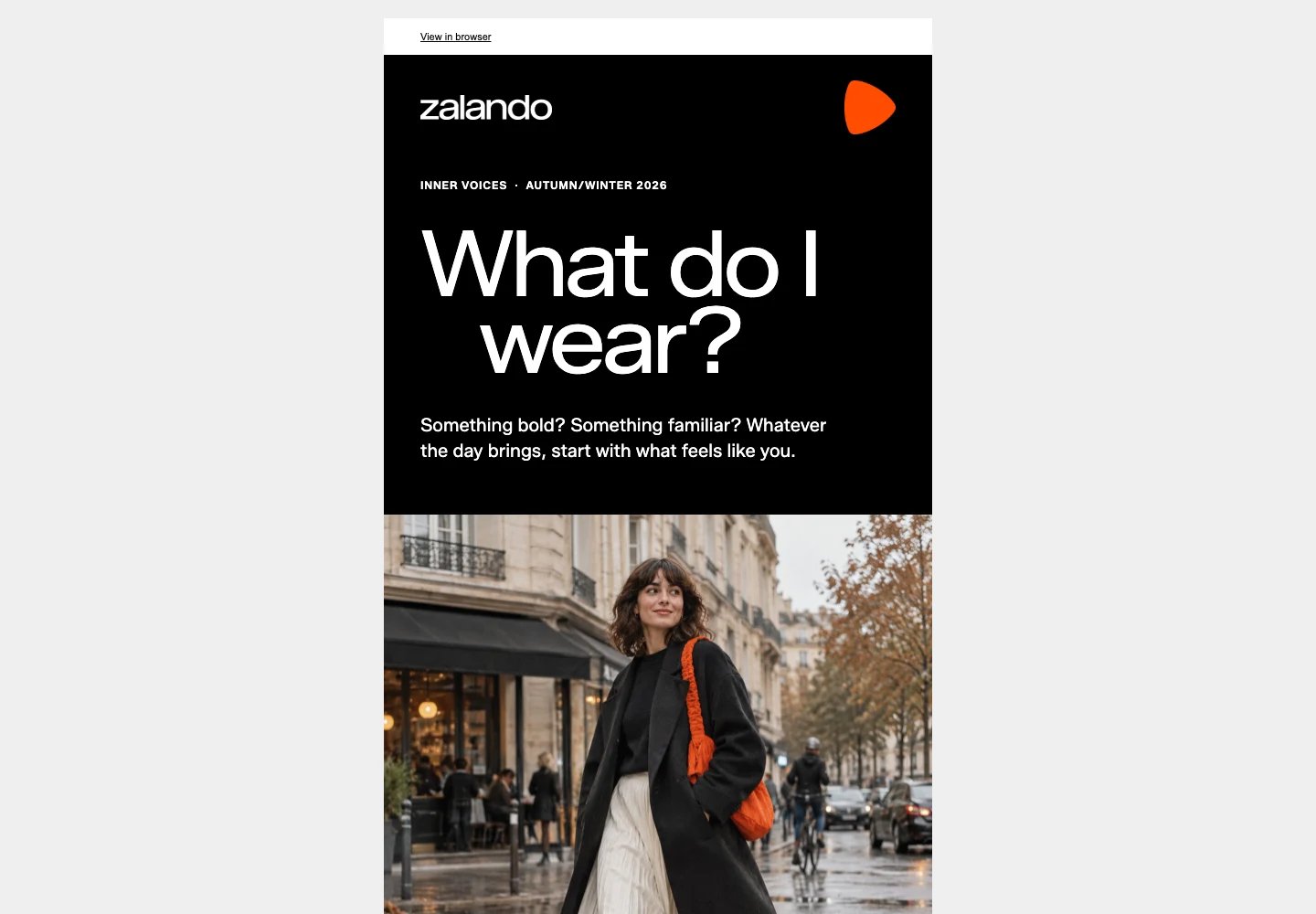 Inspect the complete Zalando concept in your browser.
Get the email source to inspect and adapt.
Rainbrand supplied Zalando's brand context for this email concept. The Autumn/Winter 2026 “Inner Voices” premise shaped the headline “What do I wear?” and the invitation to explore personal style. Typography, layout, and imagery guidance shaped the bold black-and-white type, generous space, orange accents, and an original AI-generated street-style image.
Use the same workflow to build reusable HTML email for your brand. Your connected development environment creates and previews the HTML; your email platform handles sending and analytics after you adapt and import it.
## What you need
* A development environment connected to Rainbrand through MCP.
* A ready brand in Rainbrand, or sources to [create one](/guides/create-brand).
* A campaign goal, audience, and destination for the main call to action.
## Run it with your agent
Connect Rainbrand through MCP in your development environment.
Adapt this starting prompt:
```text theme={"dark"}
Build a campaign email for [brand website or existing brand], promoting
[product or campaign] to [audience], with [primary action and destination].
Use Rainbrand for the brand context.
Reuse a matching ready brand, or create one from the supplied sources and
wait until ready. Read the relevant brand guidance and files for this email.
Inspect and use the supplied logos and images, and apply the typography
guidance with email-safe fonts.
Create a responsive HTML email with a 600px layout, email-compatible tables,
inline critical styles, a preheader, accessible text, and font fallbacks.
Apply the brand's voice and visual guidance. Use only supported product
claims. Leave explicit placeholders for sender details
and subscription links.
Preview desktop and mobile layouts, review against the brand guidance, and fix
issues. Return the HTML and a browser preview, noting what still needs testing
in email clients. Do not send or publish anything externally.
```
## How it worked
Rainbrand supplied voice, campaign, typography, layout, and imagery
guidance. The concept pairs Zalando's original wordmark and orange brand
mark with expressive typography and a full-width street-style image.
The “Inner Voices” premise turns everyday indecision about getting dressed
into a short invitation to explore personal style. An original AI-generated
image shows a person walking along a damp street in a black coat, cream
skirt, and orange shoulder bag. It uses no campaign photography, campaign
talent, celebrity likenesses, or third-party marks. The copy makes no
product or delivery claims.
A table-based layout and inline styles carry the design. The original
Zalando Sans font is bundled with the SIL Open Font License 1.1; Arial and
Helvetica provide fallbacks for email clients that do not load it.
Use desktop and mobile browser previews to check the layout and compare the
result with the brand guidance. Browser previews do not establish how every
inbox will render the email; test your target email clients before sending.
## What each system did
* Rainbrand supplied the brand guidance and assets.
* The connected development environment wrote the copy and HTML, then rendered and reviewed the preview.
* Your email platform handles contacts, sender identity, subscription links, sending, and analytics after you import the HTML.
## Before you send
* Replace the browser-view, preferences, unsubscribe, and company-address placeholders with your platform's supported values. Check the campaign claims and destination links.
* Send test emails through your platform and check the clients your audience uses, including mobile layout, blocked images, and fallback fonts.
This email is independent concept work, not official or endorsed by Zalando.
This documentation is built and hosted on [Mintlify](https://mintlify.com), a developer documentation platform.
Inspect the complete Zalando concept in your browser.
Get the email source to inspect and adapt.
Rainbrand supplied Zalando's brand context for this email concept. The Autumn/Winter 2026 “Inner Voices” premise shaped the headline “What do I wear?” and the invitation to explore personal style. Typography, layout, and imagery guidance shaped the bold black-and-white type, generous space, orange accents, and an original AI-generated street-style image.
Use the same workflow to build reusable HTML email for your brand. Your connected development environment creates and previews the HTML; your email platform handles sending and analytics after you adapt and import it.
## What you need
* A development environment connected to Rainbrand through MCP.
* A ready brand in Rainbrand, or sources to [create one](/guides/create-brand).
* A campaign goal, audience, and destination for the main call to action.
## Run it with your agent
Connect Rainbrand through MCP in your development environment.
Adapt this starting prompt:
```text theme={"dark"}
Build a campaign email for [brand website or existing brand], promoting
[product or campaign] to [audience], with [primary action and destination].
Use Rainbrand for the brand context.
Reuse a matching ready brand, or create one from the supplied sources and
wait until ready. Read the relevant brand guidance and files for this email.
Inspect and use the supplied logos and images, and apply the typography
guidance with email-safe fonts.
Create a responsive HTML email with a 600px layout, email-compatible tables,
inline critical styles, a preheader, accessible text, and font fallbacks.
Apply the brand's voice and visual guidance. Use only supported product
claims. Leave explicit placeholders for sender details
and subscription links.
Preview desktop and mobile layouts, review against the brand guidance, and fix
issues. Return the HTML and a browser preview, noting what still needs testing
in email clients. Do not send or publish anything externally.
```
## How it worked
Rainbrand supplied voice, campaign, typography, layout, and imagery
guidance. The concept pairs Zalando's original wordmark and orange brand
mark with expressive typography and a full-width street-style image.
The “Inner Voices” premise turns everyday indecision about getting dressed
into a short invitation to explore personal style. An original AI-generated
image shows a person walking along a damp street in a black coat, cream
skirt, and orange shoulder bag. It uses no campaign photography, campaign
talent, celebrity likenesses, or third-party marks. The copy makes no
product or delivery claims.
A table-based layout and inline styles carry the design. The original
Zalando Sans font is bundled with the SIL Open Font License 1.1; Arial and
Helvetica provide fallbacks for email clients that do not load it.
Use desktop and mobile browser previews to check the layout and compare the
result with the brand guidance. Browser previews do not establish how every
inbox will render the email; test your target email clients before sending.
## What each system did
* Rainbrand supplied the brand guidance and assets.
* The connected development environment wrote the copy and HTML, then rendered and reviewed the preview.
* Your email platform handles contacts, sender identity, subscription links, sending, and analytics after you import the HTML.
## Before you send
* Replace the browser-view, preferences, unsubscribe, and company-address placeholders with your platform's supported values. Check the campaign claims and destination links.
* Send test emails through your platform and check the clients your audience uses, including mobile layout, blocked images, and fallback fonts.
This email is independent concept work, not official or endorsed by Zalando.
This documentation is built and hosted on [Mintlify](https://mintlify.com), a developer documentation platform.