# Get account
Source: https://docs.rainbrand.com/api-reference/account/get-account
https://www.rainbrand.com/api/v1/spec.json get /account
Return basic profile information for the authenticated user. Use it as a `whoami` check to verify which account the credentials belong to.
# Get credit balance
Source: https://docs.rainbrand.com/api-reference/account/get-credit-balance
https://www.rainbrand.com/api/v1/spec.json get /credits
Read the credit balance and action costs for your personal account or a team. See [Credits and limits](/api/usage-limits) for billing and recovery.
# List workspaces
Source: https://docs.rainbrand.com/api-reference/account/list-workspaces
https://www.rainbrand.com/api/v1/spec.json get /workspaces
Find your personal account and teams. Use a team's ID as workspaceId when creating a brand, staging uploads, or reading its credit balance.
# Delete an audio file
Source: https://docs.rainbrand.com/api-reference/audio/delete-an-audio-file
https://www.rainbrand.com/api/v1/spec.json delete /audio/{id}
Permanently delete one audio file. This cannot be undone.
# Get an audio file
Source: https://docs.rainbrand.com/api-reference/audio/get-an-audio-file
https://www.rainbrand.com/api/v1/spec.json get /audio/{id}
Read one audio file by media ID.
# List audio files
Source: https://docs.rainbrand.com/api-reference/audio/list-audio-files
https://www.rainbrand.com/api/v1/spec.json get /audio
List audio files across your brands, newest first.
# Apply a Brand Edit
Source: https://docs.rainbrand.com/api-reference/brands/apply-a-brand-edit
https://www.rainbrand.com/api/v1/spec.json post /brands/{id}/edits/{editId}/apply
Make the proposed guidance and profile active. A stale edit cannot be applied. [Create a new edit](/api-reference/brands/create-a-brand-edit) from the current brand version.
# Continue a Brand Edit
Source: https://docs.rainbrand.com/api-reference/brands/continue-a-brand-edit
https://www.rainbrand.com/api/v1/spec.json post /brands/{id}/edits/{editId}/interactions/{interactionId}/responses
Answer a Brand Edit's request for input so preparation can continue without applying it. Check the result with [Get a Brand Edit](/api-reference/brands/get-a-brand-edit).
# Create a brand
Source: https://docs.rainbrand.com/api-reference/brands/create-a-brand
https://www.rainbrand.com/api/v1/spec.json post /brands
Build reusable brand context from your sources. Check progress with [Get a brand](/api-reference/brands/get-a-brand).
# Create a Brand Edit
Source: https://docs.rainbrand.com/api-reference/brands/create-a-brand-edit
https://www.rainbrand.com/api/v1/spec.json post /brands/{id}/edits
Prepare proposed changes without changing the active brand. Inspect progress and the proposal with [Get a Brand Edit](/api-reference/brands/get-a-brand-edit).
# Delete a brand
Source: https://docs.rainbrand.com/api-reference/brands/delete-a-brand
https://www.rainbrand.com/api/v1/spec.json delete /brands/{id}
Remove the brand from your account and cancel its running tasks. This cannot be undone.
# Discard a Brand Edit
Source: https://docs.rainbrand.com/api-reference/brands/discard-a-brand-edit
https://www.rainbrand.com/api/v1/spec.json post /brands/{id}/edits/{editId}/discard
Discard a Brand Edit without changing the active brand.
# Export a Brand Skill
Source: https://docs.rainbrand.com/api-reference/brands/export-a-brand-skill
https://www.rainbrand.com/api/v1/spec.json post /brands/{id}/exports
Prepare a downloadable ZIP of the active Brand Skill. Retrieve the download with [Get a Brand Skill export](/api-reference/brands/get-a-brand-skill-export).
# Get a brand
Source: https://docs.rainbrand.com/api-reference/brands/get-a-brand
https://www.rainbrand.com/api/v1/spec.json get /brands/{id}
Read the brand's current profile and active Brand Skill version, or check progress while it is being prepared.
# Get a Brand Edit
Source: https://docs.rainbrand.com/api-reference/brands/get-a-brand-edit
https://www.rainbrand.com/api/v1/spec.json get /brands/{id}/edits/{editId}
Check a Brand Edit's progress, requested input, and proposed changes. Inspect the full text with [Get a changed brand file](/api-reference/brands/get-a-changed-brand-file).
# Get a Brand Skill export
Source: https://docs.rainbrand.com/api-reference/brands/get-a-brand-skill-export
https://www.rainbrand.com/api/v1/spec.json get /brands/{id}/exports/{skillId}
Check an export and download its ZIP when ready. The export stays tied to the Brand Skill selected when it was requested.
# Get a changed brand file
Source: https://docs.rainbrand.com/api-reference/brands/get-a-changed-brand-file
https://www.rainbrand.com/api/v1/spec.json get /brands/{id}/edits/{editId}/files
Read the original and proposed versions of a file to inspect a [Brand Edit](/api-reference/brands/get-a-brand-edit).
# Inspect a Brand Skill
Source: https://docs.rainbrand.com/api-reference/brands/inspect-a-brand-skill
https://www.rainbrand.com/api/v1/spec.json get /brands/{id}/skill
Retrieve the complete active Brand Skill as an immutable snapshot of the brand's profile, guidance, and assets. For a ZIP, [export the Brand Skill](/api-reference/brands/export-a-brand-skill).
# List brands
Source: https://docs.rainbrand.com/api-reference/brands/list-brands
https://www.rainbrand.com/api/v1/spec.json get /brands
List the brands you can access.
# Upload a brand font
Source: https://docs.rainbrand.com/api-reference/brands/upload-a-brand-font
https://www.rainbrand.com/api/v1/spec.json post /brands/{id}/font-assets
Upload a custom font for use in a [Brand Edit](/api-reference/brands/create-a-brand-edit); uploading it alone does not change the brand.
# Get a Brief
Source: https://docs.rainbrand.com/api-reference/briefs/get-a-brief
https://www.rainbrand.com/api/v1/spec.json get /briefs/{id}
Get a Brief's current status and, when complete, its Markdown guidance and selected assets.
# Request a Brief
Source: https://docs.rainbrand.com/api-reference/briefs/request-a-brief
https://www.rainbrand.com/api/v1/spec.json post /briefs
Prepare brand guidance and selected assets for a specific task. Retrieve the result with [Get a Brief](/api-reference/briefs/get-a-brief).
# Submit feedback
Source: https://docs.rainbrand.com/api-reference/feedback/submit-feedback
https://www.rainbrand.com/api/v1/spec.json post /feedback
Report a problem or observation about Rainbrand for internal review. Continue the original task after submitting.
# Get a generation
Source: https://docs.rainbrand.com/api-reference/generations/get-a-generation
https://www.rainbrand.com/api/v1/spec.json get /generations/{id}
Retrieve a generation's status, outputs, or failure details.
# List generations
Source: https://docs.rainbrand.com/api-reference/generations/list-generations
https://www.rainbrand.com/api/v1/spec.json get /generations
List your generations, newest first. Outputs that were later deleted stay listed with available set to false.
# Start a generation
Source: https://docs.rainbrand.com/api-reference/generations/start-a-generation
https://www.rainbrand.com/api/v1/spec.json post /generations
Generate a file with a selected model. A Brand ID scopes the request; pass a completed Brief to a supported model to include brand guidance and assets. Retrieve outputs with [Get a generation](/api-reference/generations/get-a-generation).
# Delete an image
Source: https://docs.rainbrand.com/api-reference/images/delete-an-image
https://www.rainbrand.com/api/v1/spec.json delete /images/{id}
Permanently delete an image. This cannot be undone.
# Delete images
Source: https://docs.rainbrand.com/api-reference/images/delete-images
https://www.rainbrand.com/api/v1/spec.json delete /images
Permanently delete the selected images. This cannot be undone.
# Get an image
Source: https://docs.rainbrand.com/api-reference/images/get-an-image
https://www.rainbrand.com/api/v1/spec.json get /images/{id}
Retrieve an image and its current status.
# List images
Source: https://docs.rainbrand.com/api-reference/images/list-images
https://www.rainbrand.com/api/v1/spec.json get /images
Browse images from one brand or across your brands.
# Search Library images
Source: https://docs.rainbrand.com/api-reference/images/search-library-images
https://www.rainbrand.com/api/v1/spec.json post /images/search
Find Brand Library images by what they depict, such as product photos or packaging. Generated images are excluded.
# Add to a Brand Library
Source: https://docs.rainbrand.com/api-reference/library/add-to-a-brand-library
https://www.rainbrand.com/api/v1/spec.json post /brands/{id}/library
Save a file in the brand's asset collection. Identical file contents return the existing item. Images are up to 10 MiB; video and audio (beta) up to 100 MiB.
# List a Brand Library
Source: https://docs.rainbrand.com/api-reference/library/list-a-brand-library
https://www.rainbrand.com/api/v1/spec.json get /brands/{id}/library
List the images, video, and audio in a brand's Library, most recently added first. Briefs, Brand Edits, and Brand Skills can draw on Library images; video and audio stay stored for other workflows.
# Remove from a Brand Library
Source: https://docs.rainbrand.com/api-reference/library/remove-from-a-brand-library
https://www.rainbrand.com/api/v1/spec.json delete /brands/{id}/library/{mediaId}
Take a file out of a brand's Library without deleting it. Future Briefs, Brand Edits, and Brand Skill versions stop using it; published Brand Skills keep working. To delete the file, use its media family's delete endpoint.
# Get a model
Source: https://docs.rainbrand.com/api-reference/models/get-a-model
https://www.rainbrand.com/api/v1/spec.json get /models/{provider}/{model}
Read the input schema for a chosen model.
# List models
Source: https://docs.rainbrand.com/api-reference/models/list-models
https://www.rainbrand.com/api/v1/spec.json get /models
Find a model for the type of file you want to create, then read its input schema before generating.
# Get a Review
Source: https://docs.rainbrand.com/api-reference/reviews/get-a-review
https://www.rainbrand.com/api/v1/spec.json get /reviews/{id}
Read a Review's progress and completed findings.
# Request a Review
Source: https://docs.rainbrand.com/api-reference/reviews/request-a-review
https://www.rainbrand.com/api/v1/spec.json post /reviews
Check an asset against a brand's guidance. Retrieve the findings with [Get a Review](/api-reference/reviews/get-a-review).
# Upload files
Source: https://docs.rainbrand.com/api-reference/uploads/upload-files
https://www.rainbrand.com/api/v1/spec.json post /uploads
Make local files available to Rainbrand requests, such as Acme Inc.'s brand guide or an Atlas Pro product photo.
This endpoint reserves storage and returns an `uploadUrl` for each file. Send each file's raw bytes with `PUT` to its `uploadUrl`, using the returned `headers`.
Once the upload is complete, use `uploadId` to:
- Supply file sources when you [add a brand](/api-reference/brands/create-a-brand) or [prepare a Brand Edit](/api-reference/brands/create-a-brand-edit).
- [Save media in a Brand Library](/api-reference/library/add-to-a-brand-library) for reuse.
- [Upload a custom brand font](/api-reference/brands/upload-a-brand-font).
- [Request a Review](/api-reference/reviews/request-a-review) of an image or provide supporting images.
For [generation requests](/api-reference/generations/start-a-generation), pass the returned `url` where the model's input schema expects a file URL. Set `contentType` on this upload request to match the file. The `uploadUrl` is only for sending the bytes.
Uploads are temporary and expire at `expiresAt`. Uploading alone does not add the file to a brand or its Library.
# Delete a video file
Source: https://docs.rainbrand.com/api-reference/videos/delete-a-video-file
https://www.rainbrand.com/api/v1/spec.json delete /videos/{id}
Permanently delete one video file. This cannot be undone.
# Get a video file
Source: https://docs.rainbrand.com/api-reference/videos/get-a-video-file
https://www.rainbrand.com/api/v1/spec.json get /videos/{id}
Read one video file by media ID.
# List videos
Source: https://docs.rainbrand.com/api-reference/videos/list-videos
https://www.rainbrand.com/api/v1/spec.json get /videos
List videos across your brands, newest first.
# Authentication
Source: https://docs.rainbrand.com/api/authentication
Authenticate server requests with an API key or connect users through OAuth.
Use an API key for server-side requests made on behalf of your account. Use OAuth when people connect their Rainbrand accounts to your product.
## API keys
Generate a key in [account settings](https://www.rainbrand.com/account?tab=api-keys) and store it as `RAINBRAND_API_KEY` in your environment or secret manager. Keep it on the server and rotate it if exposed. Keys start with `bloom_sk_`.
```bash theme={"dark"}
curl https://www.rainbrand.com/api/v1/account \
-H "x-api-key: $RAINBRAND_API_KEY"
```
You can also send the same key as a Bearer token:
```bash theme={"dark"}
curl https://www.rainbrand.com/api/v1/account \
-H "Authorization: Bearer $RAINBRAND_API_KEY"
```
If both headers are present, `x-api-key` takes precedence.
## OAuth
Send a Rainbrand OAuth access token as `Authorization: Bearer`, stored here as `RAINBRAND_ACCESS_TOKEN`:
```bash theme={"dark"}
curl https://www.rainbrand.com/api/v1/account \
-H "Authorization: Bearer $RAINBRAND_ACCESS_TOKEN"
```
Tokens grant access to the connected user's resources under the same ownership and plan checks as API keys. The scopes describe identity and refresh access:
| Scope | Purpose |
| - | - |
| `openid` | Authenticate the user's identity with OpenID Connect. |
| `offline_access` | Request a refresh token. |
The [authorization-server metadata](https://www.rainbrand.com/.well-known/oauth-authorization-server/api/auth) publishes the current endpoints and supported scopes.
### Register a public client
Use Authorization Code with PKCE S256. Public clients register without a client secret:
```bash theme={"dark"}
curl -X POST https://www.rainbrand.com/api/auth/oauth2/register \
-H "Content-Type: application/json" \
-d '{
"token_endpoint_auth_method": "none",
"type": "user-agent-based",
"grant_types": ["authorization_code", "refresh_token"],
"response_types": ["code"],
"redirect_uris": ["https://acme.com/oauth/rainbrand/callback"]
}'
```
Replace the callback with your product's URL. Register and send the exact same `redirect_uri` during authorization; wildcards are not supported.
# Errors
Source: https://docs.rainbrand.com/api/errors
Read failed API responses and handle errors by code.
Failed API requests return an `error` object. For example, requesting a brand that cannot be found returns HTTP `404`:
```json theme={"dark"}
{
"error": {
"code": "BRAND_NOT_FOUND",
"status": 404,
"message": "Brand not found"
}
}
```
Use `code` to decide how your application responds. `message` explains the failure to a person, and optional `data` supplies details specific to the error. Each endpoint's response panel lists its error codes and fields.
For credit and billing failures, see [Credits and limits](/api/usage-limits#billing-errors).
# OpenAPI specification
Source: https://docs.rainbrand.com/api/openapi
Download the REST contract to generate clients, import requests, or inspect schemas.
The [OpenAPI specification](https://www.rainbrand.com/api/v1/spec.json) defines the current public endpoints, authentication, request and response schemas, and errors.
## Download the specification
```bash theme={"dark"}
curl https://www.rainbrand.com/api/v1/spec.json -o rainbrand-spec.json
```
The specification uses OpenAPI 3.1.1. Import it into your API client, pass it to your agents, or use it to generate a typed client.
# API quickstart
Source: https://docs.rainbrand.com/api/quickstart
Add a brand and retrieve guidance for a task through the REST API.

This example adds Acme Inc. from its website, then requests brand guidance and assets for an Atlas Pro launch image.
Use an [API key](/api/authentication#api-keys) stored as `RAINBRAND_API_KEY` in your environment. All requests use `https://www.rainbrand.com/api/v1`.
## 1. Add a brand
```bash theme={"dark"}
curl -X POST https://www.rainbrand.com/api/v1/brands \
-H "x-api-key: $RAINBRAND_API_KEY" \
-H "Content-Type: application/json" \
-d '{
"sources": [{ "kind": "website", "url": "https://acme.com" }]
}'
```
Replace the website with your own. [Create a brand](/api-reference/brands/create-a-brand) lists the supported source formats.
The response identifies the new brand:
```json theme={"dark"}
{
"data": {
"id": "e6220a5e-4a68-4d39-8bb9-5105e9a3a164",
"status": "analyzing"
}
}
```
Use your returned `data.id` in place of the example Brand ID below. If you already have a brand, find its ID with [List brands](/api-reference/brands/list-brands) and continue here.
## 2. Wait until the brand is ready
```bash theme={"dark"}
curl "https://www.rainbrand.com/api/v1/brands/e6220a5e-4a68-4d39-8bb9-5105e9a3a164?wait=true" \
-H "x-api-key: $RAINBRAND_API_KEY"
```
If `data.status` is still `analyzing`, repeat the read. Continue when it is `ready` and `data.activeSkill` is present.
If the status is `failed`, read `data.failure` for the cause before trying again. If an existing brand returns `logo_required`, complete its logo selection in Rainbrand before continuing.
## 3. Request a Brief
```bash theme={"dark"}
curl -X POST https://www.rainbrand.com/api/v1/briefs \
-H "x-api-key: $RAINBRAND_API_KEY" \
-H "Content-Type: application/json" \
-d '{
"brandSessionId": "e6220a5e-4a68-4d39-8bb9-5105e9a3a164",
"task": "A landscape launch image for Acme Inc. Atlas Pro. Center the product and include the headline \"Meet Atlas Pro\" and the call to action \"Explore Atlas Pro\"."
}'
```
The response contains the Brief's ID. Use your returned `data.id` in the next request.
## 4. Retrieve the guidance and assets
```bash theme={"dark"}
curl "https://www.rainbrand.com/api/v1/briefs/657bcf79-1f2f-47fa-90f8-9245142980ed?wait=true" \
-H "x-api-key: $RAINBRAND_API_KEY"
```
Repeat the read while `data.status` is `pending` or `processing`. When it is `completed`, `data.guidance` contains the task's brand guidance and `data.assets` contains the selected files. A failed Brief includes `data.error` with the reason and whether a new attempt may succeed.
## Use the Brief
Use the completed Brief with your own agents, models, or renderer. To generate through the AI Gateway, [get a model](/api-reference/models/get-a-model) to check its input schema, then pass the Brief's ID as `briefId`:
> **[Start a generation](/api-reference/generations/start-a-generation)**
>
> Send the model input with the completed Brief.
# Credits and limits
Source: https://docs.rainbrand.com/api/usage-limits
Request budgets, credit reservations, and how to handle billing failures.
REST and MCP use the same account credits. Limits apply at different levels: API-key requests, brand onboarding, and unfinished AI Gateway generations.
## Rate limits
### API-key requests
By default, each API key permits **120 accepted requests before a 60-second inactivity reset**. REST and MCP share this budget when they use the same key, through either supported authentication header. OAuth tokens do not use this limiter.
Every accepted request restarts the 60-second reset period; rejected requests do not extend it. On HTTP `429`, wait for the `Retry-After` delay in seconds, or 60 seconds if the header is absent. REST uses code `TOO_MANY_REQUESTS`; MCP uses `rate_limit_exceeded`.
REST responses to API-key requests include a policy header. For the default quota:
```http theme={"dark"}
RateLimit-Policy: "api-key";q=120;w=60
```
`q` reflects the key's configured quota and `w` is the inactivity reset period in seconds. This header does not report remaining requests or a reset timestamp. Invalid keys and unmatched routes can receive the default policy; requests without credentials, OAuth requests, and the public specification omit it.
For a higher request quota, [contact support][rainbrand-support].
### Brand onboarding
Each personal account or team can start **5 new brand onboardings in a rolling 60-second window**, shared across members, API keys, and OAuth tokens using REST or MCP. Replaying an accepted idempotent request and reading progress do not consume this onboarding budget. The API-key request limit applies separately.
At this limit, REST returns `TOO_MANY_REQUESTS` with `Retry-After`; MCP returns `RATE_LIMITED` with `retry_after_seconds`. Wait for the returned delay.
### AI Gateway generation
An account without an active paid plan or positive purchased credits can have **3 unfinished billed generations** at once. A paid plan granted at no charge also removes this limit.
A further REST request returns `ACTIVE_GENERATION_LIMIT_REACHED` with the oldest unfinished generation's ID and a pricing link. MCP returns the same guidance in a tool error. Wait for a generation to finish or fail before starting another, or upgrade. An unfinished generation stops occupying its slot after two hours.
## Credits
Use [Get credit balance](/api-reference/account/get-credit-balance) to read the balance and `credit_costs` for the personal account or team you are using. Those returned costs account for legacy pricing. [List workspaces](/api-reference/account/list-workspaces) identifies the teams you can access.
Current plans, credit allowances, and top-up options are on [Pricing](https://www.rainbrand.com/pricing). Plan credits renew monthly on the billing anniversary and do not roll over. Purchased top-up credits do not expire.
### AI Gateway billing
Any positive, usable credits with a known value can fund a billed generation, including signup credits. Before starting, Rainbrand reserves the estimated charge plus a **10% buffer**. The account needs enough available credits for that reservation and no outstanding debt.
After completion, Rainbrand settles the actual charge and returns unused reserved credits. If the charge exceeds the reservation, remaining credits cover the difference; an unpaid amount becomes debt. Failed or unusable output is not charged. Reservations left by interrupted jobs expire within four hours.
Completed output remains available while billing retries in the background. Models that are not billed can run without a charge.
### Billing errors
Use `error.code` to decide what to do. The HTTP status alone is not enough.
| Code | What to do |
| - | - |
| `INSUFFICIENT_CREDITS` (`402`) | Follow `data.action_url` to add credits, upgrade, or settle debt. |
| `PAYMENT_REQUIRED` (`402`) | The subscription is paused. Follow `data.action_url` to resolve payment. |
| `BILLING_TEMPORARILY_UNAVAILABLE` (`503`) | No generation started. Wait for `Retry-After`, then retry the same request and idempotency key. |
| `BILLING_CONFIRMATION_PENDING` (`409`) | No generation started, but a temporary reservation may remain. Do not resubmit automatically; check the balance first. |
| `BILLING_SETUP_ERROR` (`500`) | Nothing ran or was charged. Contact support; retrying does not resolve it. |
MCP returns the corresponding guidance in tool errors. If a credit balance read says the billing account is not set up, contact [support][rainbrand-support] with the billing ID in the message.
[rainbrand-support]: mailto:support@rainbrand.com
# Versioning and deprecation
Source: https://docs.rainbrand.com/api/versioning
Current REST API support, compatibility, and endpoint migration guidance.
The [OpenAPI specification](/api/openapi) describes the supported REST contract.
Breaking changes are handled per endpoint. Follow its migration guidance for
replacements, compatibility behavior, and any announced retirement date.
If your integration uses `POST /api/v1/images/generations`, see [Migrate image generation](/guides/migrate-image-generation).
## Deprecation headers
[`Deprecation`](https://www.rfc-editor.org/rfc/rfc9745.html) gives the deprecation
date as `@` followed by Unix time in seconds. It does not change endpoint behavior
or set a removal deadline. Follow the `Link` with `rel="deprecation"` for migration
instructions.
[`Sunset`](https://www.rfc-editor.org/rfc/rfc8594.html) gives a retirement date as
an HTTP date. Rainbrand uses it only after a retirement date is announced.
# Explore a Brand Skill
Source: https://docs.rainbrand.com/explore-brand-skill
A complete Brand Skill for TANNIN, a tea-room concept.

## Inside the folder
Agents start at `SKILL.md`, then read the relevant guidance in `references/` and use the files in `assets/` for their task.
**SKILL.md**
**references**
**brand-foundations.md**
**color-and-type.md**
**logo-and-marks.md**
**layout-and-composition.md**
**illustration-system.md**
**photography.md**
**voice-and-messaging.md**
**packaging-and-applications.md**
**generation-guidance.md**
**assets**
**manifest.json**
**images**
**svg**
**fonts**
**preview**
**source-contact-sheet.jpg**
**generated-proof-sheet.jpg**
**peach-shiso-carton.png**
**less-polite-poster.png**
**tannin-wordmark.png**
**README.md**
**ATTRIBUTION.md**
## Preview the files
Expand a file to read its full contents, including images and links. These are the files from the download.
> **SKILL.md**
>
> The entry point: brand essentials and which files to read.
>
> ```yaml Frontmatter wrap theme={"dark"}
> name: tannin-brand
> description: Apply the TANNIN example identity when creating or reviewing packaging, campaigns, social posts, print, environmental graphics, imagery, or brand copy. Use this skill whenever a task asks for TANNIN-branded work or asks to reproduce or extend this urban tea room identity. Includes visual references, editable SVG assets, fonts, composition rules, and guidance for generating new artwork.
> ```
>
> **TANNIN**
>
> Tea without ceremony. Build around oversized editorial type, grainy botanical forms, candy colors, and small, practical labels. The result should feel like tea in daily city life: a cup in hand, a bright carton on a shelf, a poster seen across the street.
>
> 
>
> **Start with the assets**
>
> 1. Read [assets/manifest.json](/images/brand-skill/tannin/files/assets/manifest.json) and inspect the source board closest to the requested output.
> 2. Read the relevant references below. Use the source images to judge proportions, texture, and density; prose alone cannot establish those details.
> 3. Reuse a bundled mark, illustration, or template where it fits. The SVGs are editable reconstructions; the original boards are visual references.
> 4. For new imagery, generate the artwork separately, then compose exact type and labels in SVG or design software. Follow [generation guidance](/images/brand-skill/tannin/files/references/generation-guidance.md.txt).
> 5. Render the result and inspect it at its intended size before delivery. Include an editable source and a preview when the task calls for a visual artifact.
>
> **Essentials**
>
> * Give one wordmark or display statement clear dominance. Use a high-contrast serif, with italic available for campaign language.
> * Let one large botanical form or ribbon cross the type or frame. Keep the silhouette simple and its surface grainy.
> * Combine ink, one pastel ground, and one to three saturated accents. Use the [working palette](/images/brand-skill/tannin/files/references/color-and-type.md.txt).
> * Place small sans-serif facts, rules, pills, or seals around the edges. Keep useful information legible.
> * Make the center dense and the outer margins calm. Use asymmetry inside a clear rectangular structure.
> * Write short, concrete phrases about tea, flavor, and everyday use.
>
> **Non-negotiables**
>
> Avoid generic wellness minimalism, beige-only luxury styling, watercolor botanical clipart, evenly spaced centered layouts, and invented Japanese or other Asian visual shorthand. Gradients are not a primary brand device. Never stretch a raster logo. Preserve deliberate overlap without obscuring product facts.
>
> Use the bundled Bodoni Moda and DM Sans as production substitutes. Their use does not establish the original identity's typefaces. Treat palette values and SVGs as reconstructed working assets.
>
> **Read for the task**
>
> | Task | References |
> | - | - |
> | Understand or review the identity | [Foundations](/images/brand-skill/tannin/files/references/brand-foundations.md.txt), [layout](/images/brand-skill/tannin/files/references/layout-and-composition.md.txt) |
> | Set a logo, seal, palette, or type hierarchy | [Logo and marks](/images/brand-skill/tannin/files/references/logo-and-marks.md.txt), [color and type](/images/brand-skill/tannin/files/references/color-and-type.md.txt) |
> | Create illustrations or image prompts | [Illustration](/images/brand-skill/tannin/files/references/illustration-system.md.txt), [generation](/images/brand-skill/tannin/files/references/generation-guidance.md.txt) |
> | Create photographs or product scenes | [Photography](/images/brand-skill/tannin/files/references/photography.md.txt), [generation](/images/brand-skill/tannin/files/references/generation-guidance.md.txt) |
> | Design cartons, sachets, cups, merchandise, or signage | [Applications](/images/brand-skill/tannin/files/references/packaging-and-applications.md.txt), [layout](/images/brand-skill/tannin/files/references/layout-and-composition.md.txt) |
> | Make posters, social posts, or campaign copy | [Layout](/images/brand-skill/tannin/files/references/layout-and-composition.md.txt), [voice](/images/brand-skill/tannin/files/references/voice-and-messaging.md.txt), [applications](/images/brand-skill/tannin/files/references/packaging-and-applications.md.txt) |
>
> **Check the output**
>
> Can you identify the dominant statement immediately? Does the illustration have a distinctive shape and visible grain? Are color, overlap, and small labels doing useful work? Is every word correct, every essential fact readable, and every linked image or font available? Compare the result with a source board before calling it finished.
>
> See [attribution](/images/brand-skill/tannin/files/ATTRIBUTION.md.txt) for provenance and [README](/images/brand-skill/tannin/files/README.md.txt) for local use.
> **references/color-and-type.md**
>
> The working palette and typography.
>
> **Color and type**
>
> Use a pastel ground with clear, saturated interruptions. Black-like ink anchors the typography; the artwork introduces the strongest color collisions.
>
> 
>
> **Reconstructed working palette**
>
> These values are practical approximations for this package, not published source specifications.
>
> | Color | Hex | Role |
> | - | - | - |
> | Ink | `#11120E` | Wordmarks, headlines, labels, fine rules |
> | Warm Ivory | `#F8F5E8` | Neutral ground and breathing room |
> | Acid Yellow | `#F8E514` | Bright artwork and accents |
> | Electric Chartreuse | `#A9DA1B` | Botanical shapes and sharp accents |
> | Powder Blue | `#A8D8EE` | Pastel ground |
> | Warm Pink | `#ECA6D5` | Pastel ground or softer artwork |
> | Cobalt | `#1647E8` | Saturated illustration contrast |
> | Tomato | `#E82745` | Saturated illustration contrast |
> | Coral | `#FF725C` | Fruit forms and warm accents |
>
> Choose ink, one pastel ground, and one to three saturated accents per composition. Repeat the chosen ground consistently within a flavor's applications. Keep small facts on a quiet, high-contrast area. Do not use the whole palette in every piece.
>
> **Production type substitutes**
>
> The original proprietary typefaces have not been identified. The bundled fonts provide a working substitute:
>
> * [Bodoni Moda](/images/brand-skill/tannin/fonts/BodoniModa-Variable.ttf): wordmark approximations, large flavor names, and display statements.
> * [Bodoni Moda Italic](/images/brand-skill/tannin/fonts/BodoniModa-Italic-Variable.ttf): campaign phrases where a more fluid gesture is useful.
> * [DM Sans](/images/brand-skill/tannin/fonts/DMSans-Variable.ttf): ingredients supplied by the brief, format labels, small descriptions, and utility text.
>
> Use a pronounced jump between display and utility sizes. Tighten display spacing by eye and keep line breaks deliberate. Let large words approach one another; give tiny text enough spacing to stay readable.
>
> Avoid setting every line in the display serif. Its contrast works because plain utility type remains available. Check font loading and line breaks in the final export, especially when opening an SVG in a different application.
> **references/layout-and-composition.md**
>
> How type, illustrations, and labels fit together.
>
> **Layout and composition**
>
> Build a clear rectangular composition around a dense center. Let large typography and one organic form interact, then position small facts or labels along the edges.
>
> 
>
> **Compose in this order**
>
> 1. Set the dominant wordmark or campaign statement. Decide its line breaks before adding decoration.
> 2. Place one large botanical intervention. Let it cross a letter, overlap a rule, or reach toward a frame edge.
> 3. Add utility information in a small sans-serif: a brief description, format, or supplied product fact.
> 4. Add a fine rule, pill, or single seal only where it organizes or balances the page.
> 5. Adjust the outer margins so the crowded center has room around it.
>
> Use asymmetry with a visible underlying alignment. A large off-center motif can balance a tall block of type. Tiny labels can sit on a shared rail even when the display lettering breaks that alignment.
>
> **Scale and overlap**
>
> Deliberate collision gives the identity energy. Preserve recognizable letter shapes and keep essential details outside the busiest overlap. If every element is equally large, reduce the supporting elements. If everything is neatly separated, increase the relationship between the main type and illustration.
>
> 
>
> Use [the poster template](/images/brand-skill/tannin/svg/templates/poster-template.svg) as a starting point. For a different aspect ratio, recompose the hierarchy and crop; do not squeeze the entire layout into a new frame.
> **references/illustration-system.md**
>
> Shapes, texture, and reusable SVGs.
>
> **Illustration system**
>
> The illustration language reduces plants and flavor cues to a few large forms: bent stems, folded petals, fruit-like loops, and curling ribbons. Grain gives those forms a tactile surface. Silhouette comes first; texture supports it.
>
> 
>
> **Construct a new motif**
>
> Start with one recognizable gesture, such as a leaf bending around a fruit or a ribbon opening into a bloom. Limit the main shape count so the artwork remains readable on a sachet. Use overlaps to suggest depth, with contrasting color areas and speckled transitions.
>
> Keep edges deliberate. Avoid watercolor bleed, stock botanical outlines, realistic botanical plates, soft 3D blobs, and decorative leaves scattered evenly around the page. The motif should have a center of gravity and enough open space for type to cross it.
>
> **Reusable assets**
>
> * [Ribbon bloom](/images/brand-skill/tannin/svg/illustrations/ribbon-bloom.svg): an editable starting point for a looping botanical gesture.
> * [Loop fruit](/images/brand-skill/tannin/svg/illustrations/loop-fruit.svg): an editable starting point for an abstract fruit form.
> * [Peach/shiso botanical](/images/brand-skill/tannin/peach-shiso-botanical.png): a generated demonstration asset for a new seasonal flavor.
>
> 
>
> The generated image is new work made for this package. Use it to understand how a fresh flavor can extend the visual language, not as evidence of an original TANNIN product.
>
> For generation, read [generation guidance](/images/brand-skill/tannin/files/references/generation-guidance.md.txt). Create the motif without text, then place it into the layout with exact typography.
## Download the Brand Skill
Extract the folder and give your agents access to `SKILL.md`.
> **[Download the TANNIN Brand Skill](https://www.rainbrand.com/downloads/tannin-brand-skill.zip)**
>
> The complete folder, including every file and asset previewed above.
Original identity by [Anna Kuziuk](https://www.behance.net/gallery/237049849/TANNIN-Urban-Tea-Room-Identity-Packaging). This example includes reconstructed assets; see `ATTRIBUTION.md` in the download. TANNIN is not a Rainbrand customer.
# Embed Rainbrand into your product
Source: https://docs.rainbrand.com/getting-started/embed-into-your-product
Manage, edit, and deploy your customers' brands with our brand infrastructure.
## How your product should integrate
> **[You have an agent or harness](/mcp/getting-started)**
>
> Use MCP. Give your agent access to Rainbrand's tools.
> **[You have a workflow or pipeline](/api/quickstart)**
>
> Use the API. Call Rainbrand from your code when your workflow needs it.
You can add your customer's brand through the [API](/guides/create-brand), then give your agents [MCP access](/mcp/getting-started) to the same brand.
## How to use Rainbrand for your customers
> **[Add your customer's brand](/guides/create-brand)**
>
> Turn your customer's sources into shared brand context.
> **[Request a Brief](/guides/request-brief)**
>
> Get the guidance and assets for a specific task.
> **[Use your own generation tools](/guides/use-your-own-generation-tools)**
>
> Pass the Brief's guidance and assets to your agent, model, or renderer.
> **[Use the AI Gateway](/guides/use-ai-gateway)**
>
> Pass the Brief to a SOTA image or video model.
> **[Request a Review](/guides/request-review)**
>
> Check an image against the brand and use the findings to revise it.
> **[Update the brand](/guides/edit-brand)**
>
> Keep guidance and assets current as the brand evolves.
## Build an agent loop

Your product can run an agent loop: create an image, request a Review, and revise using the findings. Stop when your criteria are met or you reach a retry limit.
# Add a brand
Source: https://docs.rainbrand.com/guides/create-brand
Add your brand from files, links, and written guidance.

## Add a brand from anything
Share your brand guidelines, assets, links, and written direction with Rainbrand.
- **Websites**Pages & links
- **PDF**.pdf
- **Social media**Posts & profiles
- **Logos**.svg · .png
- **Images**.png · .jpg · .webp
- **Documents**.docx · .txt
- **Presentations**.pptx
- **Typography**.otf · .ttf · .woff2
- **Colors**Palettes & rules
- **Videos**.mp4 · .mov · .webm
- **Markdown**.md
- **Direction**Voice & positioning
## Start onboarding
[Connect your agents](/mcp/getting-started), then give them your files and links. Include any guidance you want them to follow.
**MCP**
Ask your agents:
```text theme={"dark"}
Add Acme Inc. using acme.com and the attached
brand guide, logo, and social media templates.
Use the templates as composition references.
Wait until the brand is ready, then show me its name and
a summary of its guidance.
```
Replace Acme Inc. and the example sources with your own brand and files.
**API**
Send your sources to `POST /brands`:
```bash theme={"dark"}
curl -X POST https://www.rainbrand.com/api/v1/brands \
-H "x-api-key: $RAINBRAND_API_KEY" \
-H "Content-Type: application/json" \
-d '{
"sources": [
{ "kind": "website", "url": "https://acme.com" },
{
"kind": "file",
"url": "https://uploads.acme.com/temporary-brand-guide.pdf",
"filename": "brand-guide.pdf"
}
],
"instructions": "Use the PDF as the brand guide."
}'
```
Replace the example URLs and instructions with your own. See the [API reference](/api-reference/brands/create-a-brand) for authentication, source formats, and request details.
For files on your computer, see [Upload local files](/guides/upload-files).
## Next steps
Once the brand is ready, your agents can use its guidance and assets:
> **[Request a Brief](/guides/request-brief)**
>
> Get the guidance and assets for a specific task.
> **[Use your own generation tools](/guides/use-your-own-generation-tools)**
>
> Pass the Brief's guidance and assets to your agent, model, or renderer.
> **[Use the AI Gateway](/guides/use-ai-gateway)**
>
> Pass the Brief to a SOTA image or video model.
> **[Request a Review](/guides/request-review)**
>
> Check an image against the brand and use the findings to revise it.
> **[Update the brand](/guides/edit-brand)**
>
> Keep guidance and assets current as the brand evolves.
# Edit a brand
Source: https://docs.rainbrand.com/guides/edit-brand
Update your brand's guidance and identity, then review the changes before applying them.

Tell your agents what should change. Rainbrand prepares an update for you to review before it changes the brand.
## What you can update
Add more links and files, or revise any part of the brand's identity, guidance, and assets. You can use the same sources as when adding a brand.
- **Websites**Pages & links
- **PDF**.pdf
- **Social media**Posts & profiles
- **Logos**.svg · .png
- **Images**.png · .jpg · .webp
- **Documents**.docx · .txt
- **Presentations**.pptx
- **Typography**.otf · .ttf · .woff2
- **Colors**Palettes & rules
- **Videos**.mp4 · .mov · .webm
- **Markdown**.md
- **Direction**Voice & positioning
## Describe the change
Give your [connected agents](/mcp/getting-started) the change you want. Include new files or links when they help explain it.
```text theme={"dark"}
Update Acme Inc.:
- Replace yellow #FFD600 with #F2C94C.
- Add a left-to-right gradient from #F2C94C to #FF8A3D
for Atlas product graphics.
- Add Atlas Pro to our brand guidance. Its official color is
burgundy #6D1A36; use it across all Atlas Pro materials.
Keep the rest of the brand unchanged. Show me the proposed
changes before applying them.
```
Replace Acme Inc., the product names, and the color values with your own.
## Review and apply
**1. Review the proposal**
Check the proposed guidance, identity, and asset changes. Your agents may ask for more information while preparing the update.
**2. Refine, apply, or discard**
Ask for adjustments if needed. Apply the update when it is ready, or discard it to keep the brand unchanged.
**3. Use the updated brand**
After applying the update, request a new Brief so your agents use the revised guidance.
For API clients, see the [Brand Edit reference](/api-reference/brands/create-a-brand-edit).
## Next steps
> **[Request a Brief](/guides/request-brief)**
>
> Get guidance and assets for your agents' next task.
# Manage the Brand Library
Source: https://docs.rainbrand.com/guides/manage-brand-library
Keep the assets that represent your brand available to your agents.
The Brand Library is the canonical collection of assets that represent your brand. Add an asset when you want it to become part of the brand system your agents use.
## What belongs in the Library
| Assets | Examples |
| - | - |
| Images | Logos, product photos, illustrations, and visual references. |
| Video | Campaign clips, product demos, and brand footage. |
| Audio | Voiceovers, music, and sonic branding. |
Generation experiments, one-off outputs, and temporary uploads stay outside the Library unless you add them. Written guidance, colors, and typography are managed through [brand updates](/guides/edit-brand).
## Add assets
Your agents can save files from your computer, public file links, or Rainbrand generation results. For files on your computer, [upload them first](/guides/upload-files).
```text theme={"dark"}
Add this approved front-view photo of Atlas Pro to Acme Inc.'s
Brand Library so agents can reuse it in launch graphics.
```
Replace Acme Inc. with your brand and identify the files to save.
## Find assets
Ask your [connected agents](/mcp/getting-started) to show the brand's Library or find an asset for a task.
```text theme={"dark"}
Show me the Atlas Pro product photos in Acme Inc.'s Brand Library.
```
## Next steps
> **[Request a Brief](/guides/request-brief)**
>
> Get guidance and selected assets for your next task.
# Report a problem
Source: https://docs.rainbrand.com/guides/report-feedback
Tell the Rainbrand team what happened without interrupting your agents' task.
Report a bug, confusing behavior, missing capability, or disappointing result. You do not need to know the root cause.
## Send a report
Tell your [connected agents](/mcp/getting-started) what happened, what you expected, and how it affected the task:
```text wrap theme={"dark"}
Report that Rainbrand's Brand Skill export for Acme Inc. was missing
the font files listed in its guidance. Include the export ID if available,
but leave out private prompts and source files. Then continue the task.
```
Replace the example with your observation. Leave out credentials, personal or customer data, transcripts, and private task content.
For API clients, see [Submit feedback](/api-reference/feedback/submit-feedback).
## After reporting
Reports go to the Rainbrand team for internal review. They do not open a support conversation or guarantee a reply.
Report each issue once and continue the task, even if submission fails. For help resolving a blocked task, see [Troubleshooting](/mcp/troubleshooting).
# Request a Brief
Source: https://docs.rainbrand.com/guides/request-brief
A Brief is the subset of your brand's guidance and assets relevant to a specific task.
## Describe the task
Start with a [ready brand](/guides/create-brand). Tell your [connected agents](/mcp/getting-started) what to make, who it is for, and any required copy or constraints.
```text wrap theme={"dark"}
Request a Brief for Acme Inc.
We're making a 1600 × 900 launch image for Atlas Pro,
aimed at product designers. Include the headline "Meet Atlas Pro"
and the call to action "Explore Atlas Pro".
Wait for the Brief, then show me its guidance and selected assets.
```
Replace Acme Inc., the product, and the requirements with your own.
For API clients, see [Request a Brief](/api-reference/briefs/request-a-brief) and [Get a Brief](/api-reference/briefs/get-a-brief).
## Example response
This Brief guided the [Eager campaign example](https://www.rainbrand.com/examples/eager): an independent concept for a Blackcurrants flavour, with packaging and launch assets. It shows the selected guidance and assets for that task, including which ideas came from the task rather than the brand's sources.
> **View the Eager Brief**
>
> The completed response, with guidance and selected assets.
>
> **Human readable**
>
> ### Eager brand context for this work — independent concept only
>
> #### Concept boundary and source limits
>
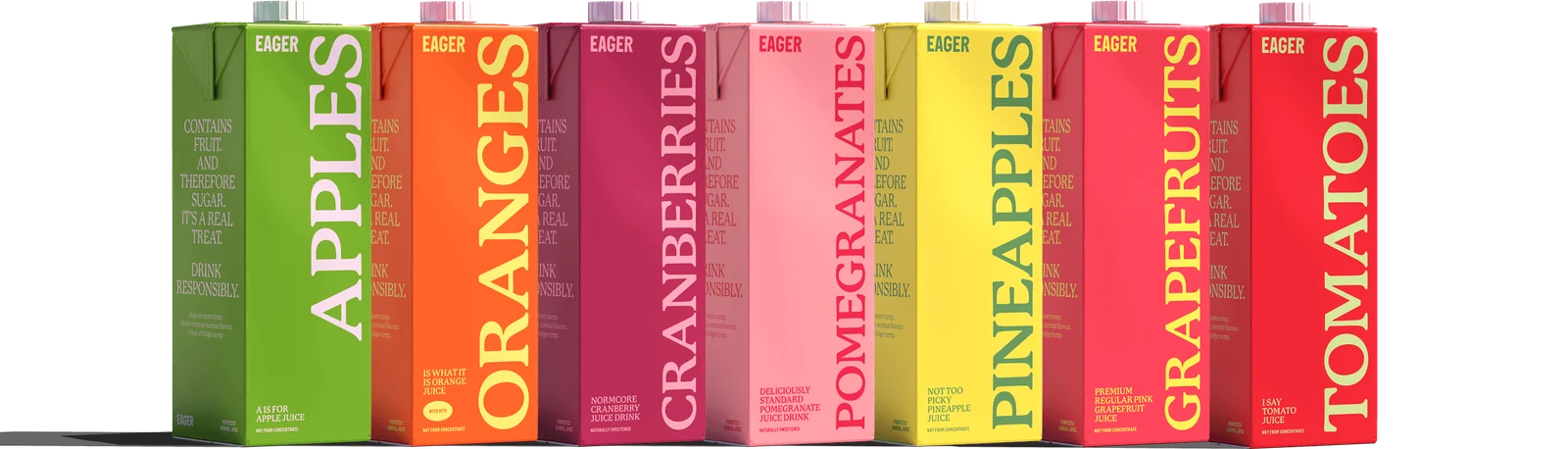
> The pinned Eager material shows a seven-carton range and supplies **no Blackcurrant product, Blackcurrant-specific imagery, formula or launch approval**. Keep the proposed Blackcurrants carton and every launch asset clearly framed as a hypothetical, independent mock-up—not an eighth real Eager SKU, release, or availability announcement. Do not turn the concept into a permanent brand or range fact. The requested purple/lilac treatment, 1L size, carton wording, and “already at drinking strength” premise come from the task; they are not confirmed Eager product specifications. The image library also includes a Tomato carton marked 1.5L, so the sources do not establish a universal 1L size for the range. Use the existing cartons as visual references, not proof of a range-wide pack size.
>
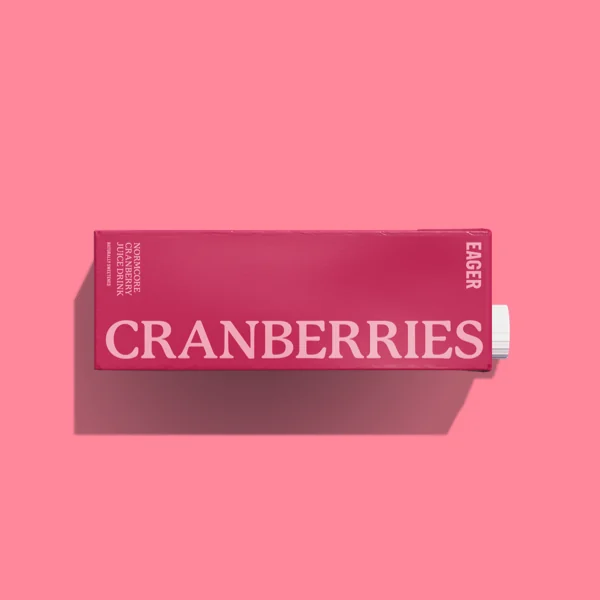
> The pinned visual range assets show the existing fruit names on their cartons (including “GRAPEFRUITS”); retain those source products as they are. No supplied image depicts blackcurrants. In particular, the cranberry carton below is a packaging reference, not a blackcurrant stand-in. Any generated eight-carton lineup must be understood as a concept visualization, not a factual Eager range photograph.
>
> #### Logo and type
>
> The profile has no published logo catalog. Use the supplied primary white EAGER SVG as the general fallback; retain the artwork rather than redrawing or substituting it. A green wordmark SVG is also present in the identity references, but is not a catalog-listed variant; use it only when appropriate to the layout and contrast.
>
> * [Primary EAGER white wordmark (SVG)](https://www.rainbrand.com/examples/eager/brief/eager-wordmark-white.svg)
> * [Green EAGER wordmark artwork (SVG)](https://www.rainbrand.com/examples/eager/brief/eager-wordmark-green.svg)
>
> P22 Mackinac Pro is the primary display and text face; the profile specifies weight 500 for that role. These supplied static WOFF2 files and their matching specimens are available:
>
> * [P22 Mackinac Pro 400 (WOFF2)](https://www.rainbrand.com/examples/eager/fonts/p22-mackinac-pro-400.woff2) · 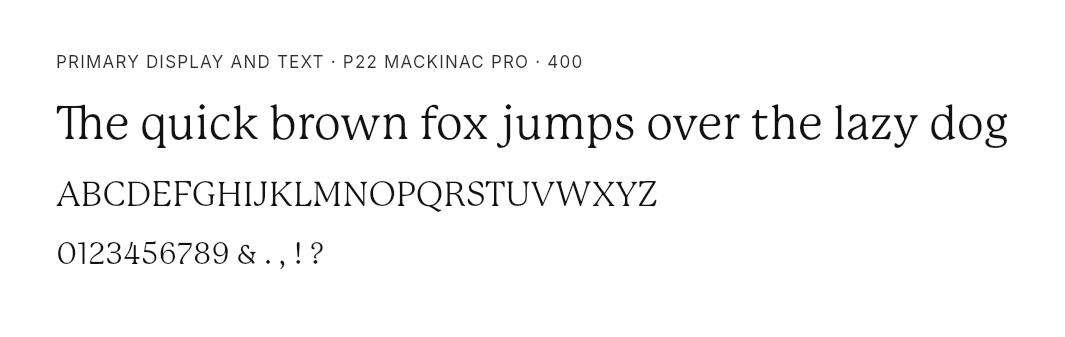
> * [P22 Mackinac Pro 500 (WOFF2)](https://www.rainbrand.com/examples/eager/fonts/p22-mackinac-pro-500.woff2) · 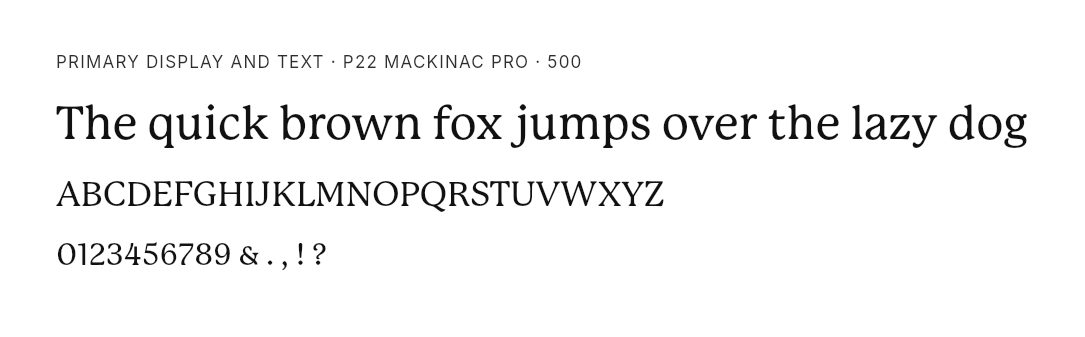
> * [P22 Mackinac Pro 700 (WOFF2)](https://www.rainbrand.com/examples/eager/fonts/p22-mackinac-pro-700.woff2) · 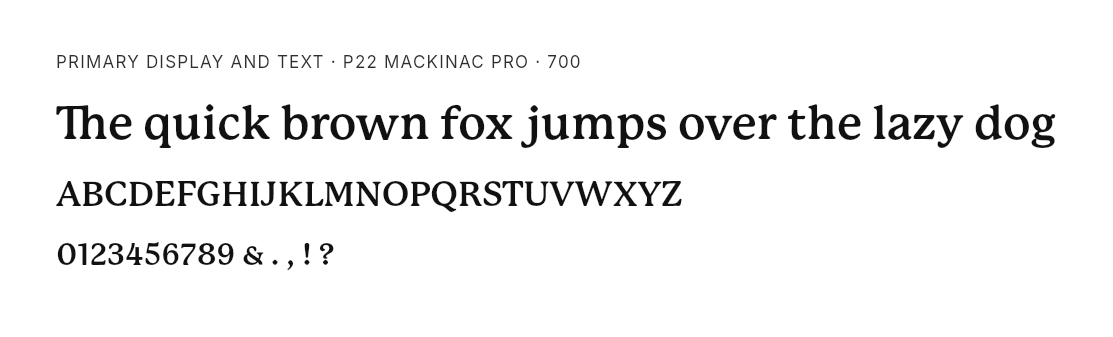
> * [P22 Mackinac Pro 800 (WOFF2)](https://www.rainbrand.com/examples/eager/fonts/p22-mackinac-pro-800.woff2) · 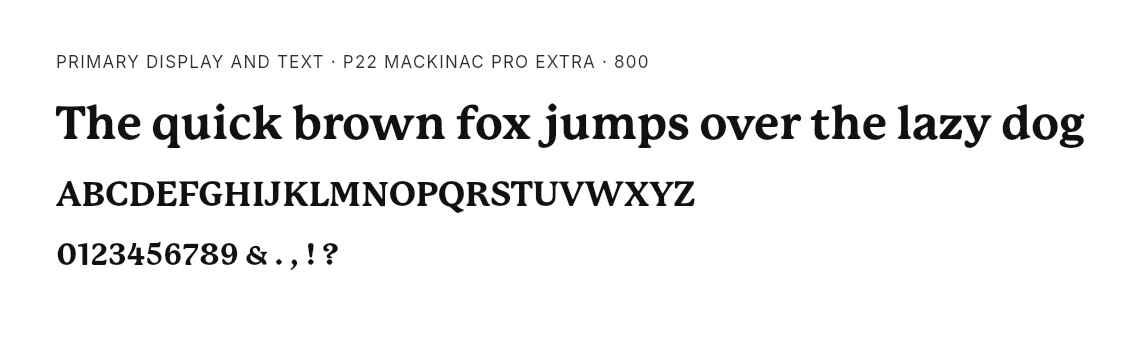
> * Alternate heading face: [Italian Plate No2 Regular (WOFF2)](https://www.rainbrand.com/examples/eager/fonts/italian-plate-no2-400.woff2) · 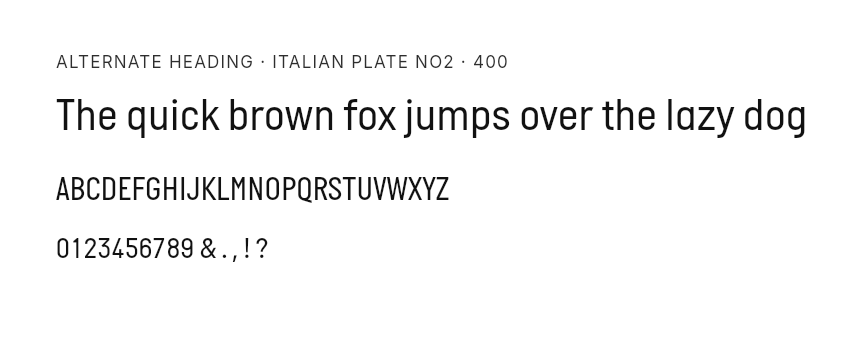
>
> Times New Roman is named for smaller secondary heading/button treatments, but no custom file is supplied for it. Keep the contrast between the distinctive P22 display face and straightforward supporting copy. For carton styling, match the supplied pack photography; use the actual logo asset in designed layouts rather than trusting generated lettering to reproduce it accurately.
>
> #### Carton and range references
>
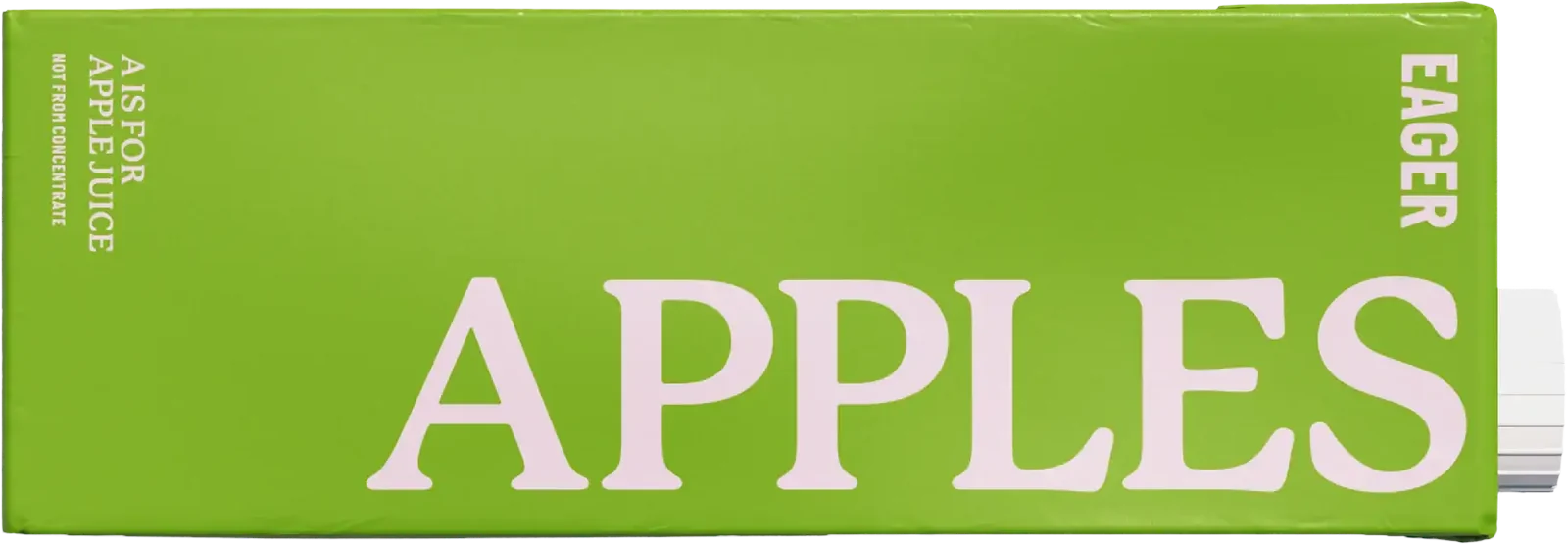
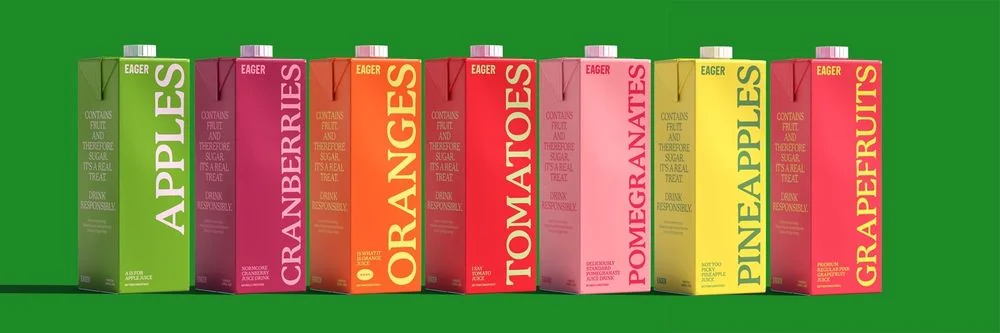
> These existing-flavour pack images show useful details of Eager’s carton system—bold serif fruit names, vertical EAGER treatment, small descriptor text, colour-led cartons and white screw caps. Do not reuse or relabel their flavour-specific copy as Blackcurrant packaging.
>
> 
>
> 
>
> The seven-carton source lineups are the best references for the current range’s colour rhythm and presentation. They do not make the proposed eighth carton an actual Eager product.
>
> 
>
> 
>
> #### Campaign and lifestyle image references
>
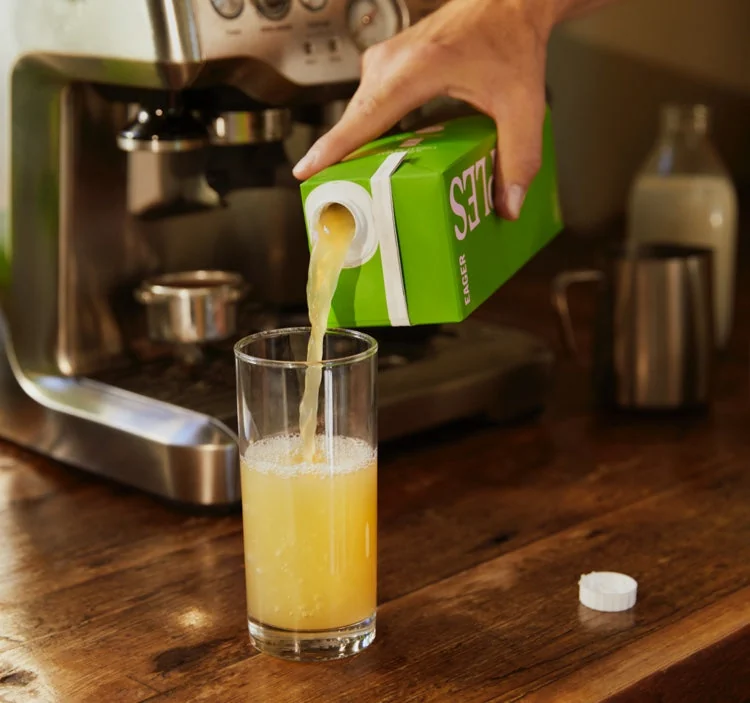
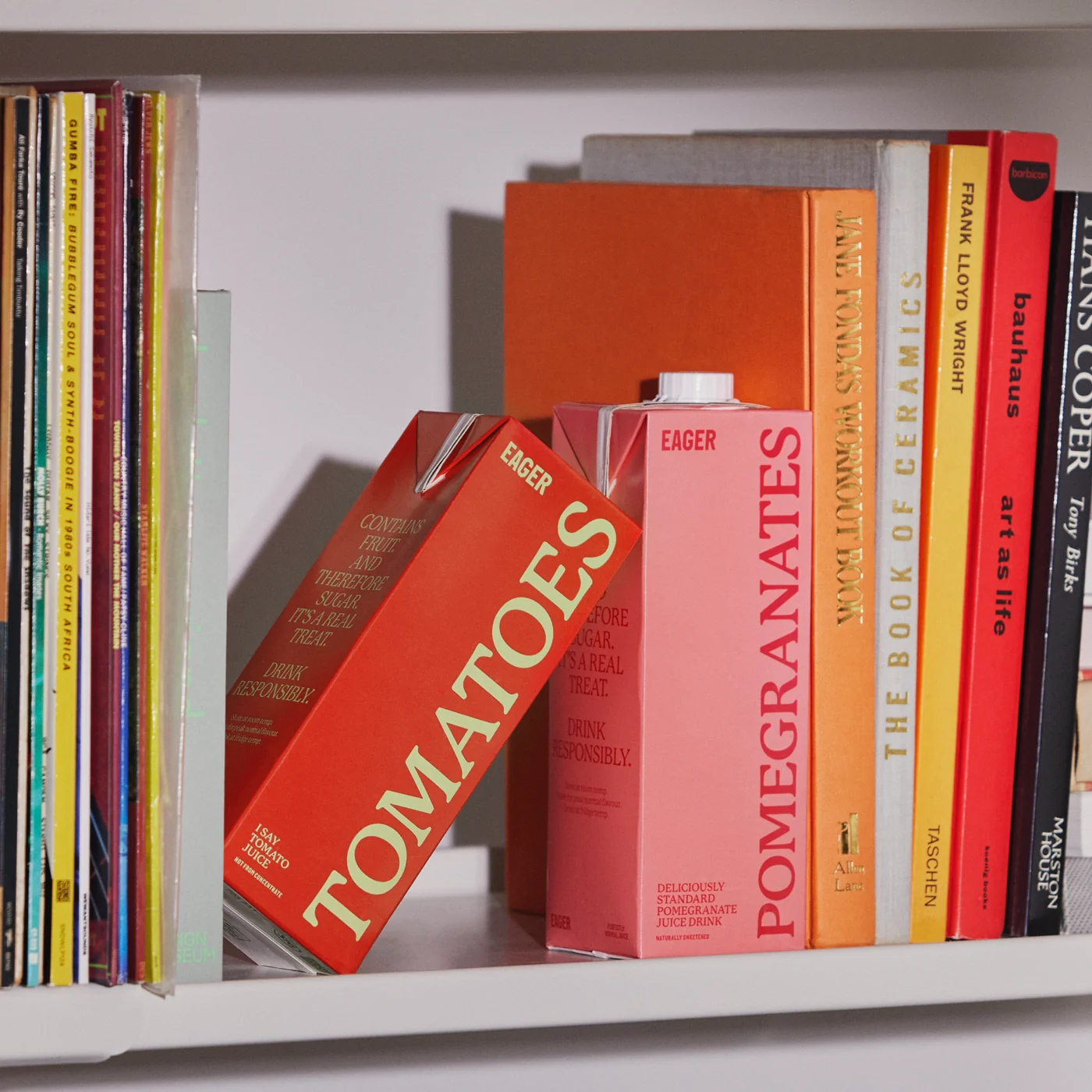
> For the requested use scenes, these give grounded, product-led cues: a warm domestic pour into a glass and cartons arranged on a home bookshelf. Treat the bookshelf as a home-storage styling reference, not evidence of a specific cupboard or shelf-life claim. The supplied lifestyle/product imagery is specific to its pictured flavour; do not present the pictured apple, tomato, or pomegranate product as Blackcurrant.
>
> 
>
> 
>
> The campaign references support clean, colour-forward, product-first compositions; the library includes both crisp studio/flat-lay product shots and warm, natural domestic scenes. Keep the carton and message legible, and avoid adding decorative or product claims not in the brief. There is no Blackcurrant fruit image in the pinned material, so a generated blackcurrant visual would be new concept imagery, not a sourced brand asset.
>
> #### Colour and voice
>
> The documented core palette is Yellow **#FFF064**, Charcoal **#3A3A3A**, and White **#FFFFFF**. Website implementations also use Black **#000000** and Green **#1D8927** as site-level colours. Purple and lilac are not documented Eager brand colours: use them only as the task’s hypothetical flavour direction, not as a revision to the brand palette.
>
> The voice is friendly, matter-of-fact, direct, lightly irreverent and unpretentious. Prefer short, conversational phrases, dry wit, familiar details and British English spelling (for example, “flavour” and “fridge”). Keep the promise clear rather than grandiose. The requested deadpan campaign lines fit those voice traits, but remain concept copy—not approved Eager brand statements.
>
> #### Product-claim limits
>
> The Brand guidance supports saying that an unopened airtight carton can be stored at room temperature and should be refrigerated after opening. It also calls for candid acknowledgement that juice contains fruit sugars, responsible enjoyment, and no health-product positioning. For this hypothetical flavour, stay within the task’s narrower permission: the storage instruction and the supplied fruit/sugar/responsibility wording only. The latter is not a Blackcurrant-specific product specification verified by the Brand sources. The “already at drinking strength” idea and carton descriptor are task-supplied concept propositions, not Brand-verified product facts; do not extend them into ingredient, formulation, dilution, nutrition, or other claims.
>
> Do not add health, ingredient/formula, price, availability, endorsement, sustainability or other product claims. Do not import general site delivery copy into this concept, and do not generalize “100% juice” or “never from concentrate” across Eager’s range. These constraints take precedence over any broader claims or ecommerce content in existing Brand materials.
>
> Source guidance consulted: `references/imagery-brand-identity.md`, `references/brand-voice.md`, `references/imagery-campaign-editorial.md`, `references/color.md`, `references/imagery-product.md`, `references/typography.md`, `references/imagery-interface.md`, and `references/product-claims.md` for pinned version `9e1d3f71-f0b5-5cd3-a8a1-f2e28ec02a0f`.
>
> **JSON**
>
> ```json Response wrap theme={"dark"}
> {
> "brief_id": "38483b58-5b8c-47cf-b582-cee4cabc240f",
> "status": "completed",
> "skill_id": "9e1d3f71-f0b5-5cd3-a8a1-f2e28ec02a0f",
> "created_at": "2026-10-21T23:47:49.946Z",
> "completed_at": "2026-10-21T23:49:29.604Z",
> "guidance": "# Eager brand context for this work — independent concept only\n\n## Concept boundary and source limits\nThe pinned Eager material shows a seven-carton range and supplies **no Blackcurrant product, Blackcurrant-specific imagery, formula or launch approval**. Keep the proposed Blackcurrants carton and every launch asset clearly framed as a hypothetical, independent mock-up—not an eighth real Eager SKU, release, or availability announcement. Do not turn the concept into a permanent brand or range fact. The requested purple/lilac treatment, 1L size, carton wording, and “already at drinking strength” premise come from the task; they are not confirmed Eager product specifications. The image library also includes a Tomato carton marked 1.5L, so the sources do not establish a universal 1L size for the range. Use the existing cartons as visual references, not proof of a range-wide pack size.\n\nThe pinned visual range assets show the existing fruit names on their cartons (including “GRAPEFRUITS”); retain those source products as they are. No supplied image depicts blackcurrants. In particular, the cranberry carton below is a packaging reference, not a blackcurrant stand-in. Any generated eight-carton lineup must be understood as a concept visualization, not a factual Eager range photograph.\n\n## Logo and type\nThe profile has no published logo catalog. Use the supplied primary white EAGER SVG as the general fallback; retain the artwork rather than redrawing or substituting it. A green wordmark SVG is also present in the identity references, but is not a catalog-listed variant; use it only when appropriate to the layout and contrast.\n\n- [Primary EAGER white wordmark (SVG)](https://www.rainbrand.com/examples/eager/brief/eager-wordmark-white.svg)\n- [Green EAGER wordmark artwork (SVG)](https://www.rainbrand.com/examples/eager/brief/eager-wordmark-green.svg)\n\nP22 Mackinac Pro is the primary display and text face; the profile specifies weight 500 for that role. These supplied static WOFF2 files and their matching specimens are available:\n\n- [P22 Mackinac Pro 400 (WOFF2)](https://www.rainbrand.com/examples/eager/fonts/p22-mackinac-pro-400.woff2) · \n- [P22 Mackinac Pro 500 (WOFF2)](https://www.rainbrand.com/examples/eager/fonts/p22-mackinac-pro-500.woff2) · \n- [P22 Mackinac Pro 700 (WOFF2)](https://www.rainbrand.com/examples/eager/fonts/p22-mackinac-pro-700.woff2) · \n- [P22 Mackinac Pro 800 (WOFF2)](https://www.rainbrand.com/examples/eager/fonts/p22-mackinac-pro-800.woff2) · \n- Alternate heading face: [Italian Plate No2 Regular (WOFF2)](https://www.rainbrand.com/examples/eager/fonts/italian-plate-no2-400.woff2) · \n\nTimes New Roman is named for smaller secondary heading/button treatments, but no custom file is supplied for it. Keep the contrast between the distinctive P22 display face and straightforward supporting copy. For carton styling, match the supplied pack photography; use the actual logo asset in designed layouts rather than trusting generated lettering to reproduce it accurately.\n\n## Carton and range references\nThese existing-flavour pack images show useful details of Eager’s carton system—bold serif fruit names, vertical EAGER treatment, small descriptor text, colour-led cartons and white screw caps. Do not reuse or relabel their flavour-specific copy as Blackcurrant packaging.\n\n\n\n\nThe seven-carton source lineups are the best references for the current range’s colour rhythm and presentation. They do not make the proposed eighth carton an actual Eager product.\n\n\n\n\n## Campaign and lifestyle image references\nFor the requested use scenes, these give grounded, product-led cues: a warm domestic pour into a glass and cartons arranged on a home bookshelf. Treat the bookshelf as a home-storage styling reference, not evidence of a specific cupboard or shelf-life claim. The supplied lifestyle/product imagery is specific to its pictured flavour; do not present the pictured apple, tomato, or pomegranate product as Blackcurrant.\n\n\n\n\nThe campaign references support clean, colour-forward, product-first compositions; the library includes both crisp studio/flat-lay product shots and warm, natural domestic scenes. Keep the carton and message legible, and avoid adding decorative or product claims not in the brief. There is no Blackcurrant fruit image in the pinned material, so a generated blackcurrant visual would be new concept imagery, not a sourced brand asset.\n\n## Colour and voice\nThe documented core palette is Yellow **#FFF064**, Charcoal **#3A3A3A**, and White **#FFFFFF**. Website implementations also use Black **#000000** and Green **#1D8927** as site-level colours. Purple and lilac are not documented Eager brand colours: use them only as the task’s hypothetical flavour direction, not as a revision to the brand palette.\n\nThe voice is friendly, matter-of-fact, direct, lightly irreverent and unpretentious. Prefer short, conversational phrases, dry wit, familiar details and British English spelling (for example, “flavour” and “fridge”). Keep the promise clear rather than grandiose. The requested deadpan campaign lines fit those voice traits, but remain concept copy—not approved Eager brand statements.\n\n## Product-claim limits\nThe Brand guidance supports saying that an unopened airtight carton can be stored at room temperature and should be refrigerated after opening. It also calls for candid acknowledgement that juice contains fruit sugars, responsible enjoyment, and no health-product positioning. For this hypothetical flavour, stay within the task’s narrower permission: the storage instruction and the supplied fruit/sugar/responsibility wording only. The latter is not a Blackcurrant-specific product specification verified by the Brand sources. The “already at drinking strength” idea and carton descriptor are task-supplied concept propositions, not Brand-verified product facts; do not extend them into ingredient, formulation, dilution, nutrition, or other claims.\n\nDo not add health, ingredient/formula, price, availability, endorsement, sustainability or other product claims. Do not import general site delivery copy into this concept, and do not generalize “100% juice” or “never from concentrate” across Eager’s range. These constraints take precedence over any broader claims or ecommerce content in existing Brand materials.\n\nSource guidance consulted: `references/imagery-brand-identity.md`, `references/brand-voice.md`, `references/imagery-campaign-editorial.md`, `references/color.md`, `references/imagery-product.md`, `references/typography.md`, `references/imagery-interface.md`, and `references/product-claims.md` for pinned version `9e1d3f71-f0b5-5cd3-a8a1-f2e28ec02a0f`.\n",
> "assets": [
> {
> "kind": "image",
> "media_type": "image/svg+xml",
> "url": "https://www.rainbrand.com/examples/eager/brief/eager-wordmark-white.svg",
> "inline": {
> "status": "included"
> }
> },
> {
> "kind": "image",
> "media_type": "image/svg+xml",
> "url": "https://www.rainbrand.com/examples/eager/brief/eager-wordmark-green.svg",
> "inline": {
> "status": "included"
> }
> },
> {
> "kind": "font",
> "media_type": "font/woff2",
> "url": "https://www.rainbrand.com/examples/eager/fonts/p22-mackinac-pro-400.woff2",
> "inline": {
> "status": "omitted",
> "reason": "not_supported"
> }
> },
> {
> "kind": "font_render",
> "media_type": "image/png",
> "url": "https://www.rainbrand.com/examples/eager/brief/p22-mackinac-pro-400-specimen.png",
> "inline": {
> "status": "included"
> }
> },
> {
> "kind": "font",
> "media_type": "font/woff2",
> "url": "https://www.rainbrand.com/examples/eager/fonts/p22-mackinac-pro-500.woff2",
> "inline": {
> "status": "omitted",
> "reason": "not_supported"
> }
> },
> {
> "kind": "font_render",
> "media_type": "image/png",
> "url": "https://www.rainbrand.com/examples/eager/brief/p22-mackinac-pro-500-specimen.png",
> "inline": {
> "status": "included"
> }
> },
> {
> "kind": "font",
> "media_type": "font/woff2",
> "url": "https://www.rainbrand.com/examples/eager/fonts/p22-mackinac-pro-700.woff2",
> "inline": {
> "status": "omitted",
> "reason": "not_supported"
> }
> },
> {
> "kind": "font_render",
> "media_type": "image/png",
> "url": "https://www.rainbrand.com/examples/eager/brief/p22-mackinac-pro-700-specimen.png",
> "inline": {
> "status": "included"
> }
> },
> {
> "kind": "font",
> "media_type": "font/woff2",
> "url": "https://www.rainbrand.com/examples/eager/fonts/p22-mackinac-pro-800.woff2",
> "inline": {
> "status": "omitted",
> "reason": "not_supported"
> }
> },
> {
> "kind": "font_render",
> "media_type": "image/png",
> "url": "https://www.rainbrand.com/examples/eager/brief/p22-mackinac-pro-800-specimen.png",
> "inline": {
> "status": "included"
> }
> },
> {
> "kind": "font",
> "media_type": "font/woff2",
> "url": "https://www.rainbrand.com/examples/eager/fonts/italian-plate-no2-400.woff2",
> "inline": {
> "status": "omitted",
> "reason": "not_supported"
> }
> },
> {
> "kind": "font_render",
> "media_type": "image/png",
> "url": "https://www.rainbrand.com/examples/eager/brief/italian-plate-no2-400-specimen.png",
> "inline": {
> "status": "included"
> }
> },
> {
> "kind": "image",
> "media_type": "image/webp",
> "url": "https://www.rainbrand.com/examples/eager/brief/apples-carton.webp",
> "inline": {
> "status": "included"
> }
> },
> {
> "kind": "image",
> "media_type": "image/webp",
> "url": "https://www.rainbrand.com/examples/eager/brief/cranberries-carton.webp",
> "inline": {
> "status": "included"
> }
> },
> {
> "kind": "image",
> "media_type": "image/webp",
> "url": "https://www.rainbrand.com/examples/eager/brief/range.webp",
> "inline": {
> "status": "included"
> }
> },
> {
> "kind": "image",
> "media_type": "image/webp",
> "url": "https://www.rainbrand.com/examples/eager/brief/range-on-green.webp",
> "inline": {
> "status": "included"
> }
> },
> {
> "kind": "image",
> "media_type": "image/webp",
> "url": "https://www.rainbrand.com/examples/eager/brief/kitchen-pour.webp",
> "inline": {
> "status": "included"
> }
> },
> {
> "kind": "image",
> "media_type": "image/webp",
> "url": "https://www.rainbrand.com/examples/eager/brief/bookshelf.webp",
> "inline": {
> "status": "included"
> }
> }
> ],
> "message_for_assistant": "Use the guidance and selected assets for the task. If they do not match the request, call create_brief again with a corrected task. If the underlying Brand is wrong, tell the user. When presenting the Brief to a person, include the guidance and show the assets."
> }
> ```
## Use the Brief
Pass the original task, the Brief's guidance, and its selected assets to the agents or tools creating the output.
> **[Use your own generation tools](/guides/use-your-own-generation-tools)**
>
> Pass the Brief's guidance and assets to your agent, model, or renderer.
> **[Use the AI Gateway](/guides/use-ai-gateway)**
>
> Pass the Brief to a SOTA image or video model.
# Request a Review
Source: https://docs.rainbrand.com/guides/request-review
Check an asset against your brand and use the findings to guide revisions.
## Review an asset
Start with a [ready brand](/guides/create-brand) and an image. Ask your [connected agents](/mcp/getting-started):
```text wrap theme={"dark"}
Review Acme Inc.'s Atlas Pro launch image against the brand.
Check colors, typography, logo, and copy. The headline should
read "Meet Atlas Pro" and the call to action "Explore Atlas Pro".
Wait for the Review, then show me the findings and evidence pictures.
```
Replace Acme Inc., the image, and the expected copy with your own. If your agents cannot access the image on your computer, [upload it through the file picker](/guides/upload-files).
## Read the findings
Each check includes a verdict, a short reason, and evidence pictures where available.
| Verdict | What to do |
| - | - |
| `pass` | No revision is needed for this check. |
| `fail` | Use the finding to revise the image. |
| `uncertain` | Inspect the finding or provide clearer references. |
| `not_applicable` | Skip it. The image has no relevant element for this check. |
## See a Review example
This Adesso Bakeshop gift-box creative shows the regions checked against brand references.

Detected regions for copy, color, typography, and logo checks.
The evidence below shows the color, typography, and logo comparisons.
**Color**

Extracted colors compared with the brand palette.
**Typography**

Typography passes with Inter Bold 700 and Inter Regular 400.
**Logo**

The logo passes: unaltered, legible, and properly positioned.
## Review loop
Your agents can use the findings with their generation tools to revise the asset. Reviews do not edit assets automatically.
```text wrap theme={"dark"}
Use the findings to revise the Atlas Pro image, then review it again.
Make up to two editing rounds. Stop when the applicable checks pass,
an operation fails, or a finding needs my judgment.
Show me the final image and any remaining issues.
```
Adjust the editing limit for your task.
# Upload local files
Source: https://docs.rainbrand.com/guides/upload-files
Give your agents access to local files through Rainbrand's file picker.
When your agents cannot access files on your computer, use Rainbrand's file picker to upload them.
## Open the file picker
In a client that supports MCP Apps, ask your [connected agents](/mcp/getting-started):
```text theme={"dark"}
Open Rainbrand's file picker so I can upload the brand guide
and logo for Acme Inc. Tell me when the files are ready.
```
Replace Acme Inc. with your brand and select the files you want to upload.
Agents that can read the files and make HTTP requests can upload directly without the picker. See the [upload reference](/api-reference/uploads/upload-files) for API uploads.
## Use the uploaded files
> **[Add a brand](/guides/create-brand)**
>
> Add your brand from files, links, and written guidance.
> **[Edit a brand](/guides/edit-brand)**
>
> Use new files to update the brand's identity and guidance.
> **[Manage the Brand Library](/guides/manage-brand-library)**
>
> Save assets for your agents to reuse.
# Use the AI Gateway
Source: https://docs.rainbrand.com/guides/use-ai-gateway
Access SOTA models through your Rainbrand connection.
Generate images, video, audio, and SVGs without setting up separate model integrations. You can also [use your own generation tools](/guides/use-your-own-generation-tools).
## Generate with your agents
[Request a Brief](/guides/request-brief) for the task. Then ask your [connected agents](/mcp/getting-started):
```text wrap theme={"dark"}
Use the completed Brief for Acme Inc.'s Atlas Pro launch
to generate a landscape image through the AI Gateway.
Center the product and include the headline "Meet Atlas Pro"
and the call to action "Explore Atlas Pro".
Use GPT Image 2.5 Sunburst (openai/gpt-image-2.5-sunburst).
Wait for the result and show me the image.
```
Replace Acme Inc., the product, and the required copy with your own.
For API clients, see [Get a model](/api-reference/models/get-a-model), [Start a generation](/api-reference/generations/start-a-generation), and [Get a generation](/api-reference/generations/get-a-generation).
## Review the result
> **[Request a Review](/guides/request-review)**
>
> Check an image against your brand and use the findings to revise it.
# Use a Brand Skill
Source: https://docs.rainbrand.com/guides/use-brand-skill
Retrieve or export a complete snapshot of your brand's guidance and assets.

A Brand Skill is a complete, versioned snapshot of a brand's identity, guidance, and asset references.
Your agents can work with your brand through [MCP](/mcp/getting-started). Rainbrand's tools already use its guidance and assets for Briefs and Reviews; you do not need to retrieve or export a Brand Skill first.
## What it contains
| Part | What it gives your agents |
| - | - |
| Profile | The brand's identity, including its colors, logos, and typography. |
| Guidance | Markdown files describing how to use the brand. |
| Assets | References to the brand's files, with assets bundled in the exported folder. |
## Retrieve or export
Retrieve or export it when your agents or application need the complete brand in another environment.
> **[Retrieve a snapshot](/api-reference/brands/inspect-a-brand-skill)**
>
> Read the profile, guidance, and asset references as structured data through the API.
> **[Export the folder](#export-the-folder)**
>
> Download a ZIP for agents and tools that work with local files.
## Export the folder
Use the API to export a downloadable folder.
1. [Start an export](/api-reference/brands/export-a-brand-skill) for the brand.
2. [Check the export](/api-reference/brands/get-a-brand-skill-export) and download the ZIP when it is ready.
3. Extract it and keep the folder structure together so its relative links work.
## Use it with your agents
Give your agents the folder or retrieved context. For a downloaded folder, try:
```text theme={"dark"}
Use Acme Inc.'s Brand Skill folder to create a product launch image.
Start with SKILL.md and read the guidance for this task.
```
Replace Acme Inc. and the task with your own.
## See an example
> **[Explore a Brand Skill](/explore-brand-skill)**
>
> See TANNIN's guidance, visual references, and editable assets.
# Use your own generation tools
Source: https://docs.rainbrand.com/guides/use-your-own-generation-tools
Use Rainbrand's guidance and assets with your existing models and generation tools.
The AI Gateway is optional. Your agents can use Rainbrand's brand guidance and assets with the generation tools you already have, including your own provider accounts, API keys, and credits.
## Where generation runs
| | Your own generation tools | AI Gateway |
| - | - | - |
| Model access | Your existing models, tools, or provider accounts. | SOTA models through Rainbrand's MCP or API. |
| Brand context | Give your tools the Brief's guidance and assets. | Pass the completed Brief with the generation request. |
| Setup | Keep your existing generation integration. | Access models through your Rainbrand connection. |
Use the [AI Gateway](/guides/use-ai-gateway) when you want model access through Rainbrand without setting up separate model integrations. Use your own tools when you already have the models, credits, or generation pipeline you need.
## Generate with your own tools
Start with a [ready brand](/guides/create-brand) and agents that can access your generation tools.
**1. Request a Brief**
[Describe the task](/guides/request-brief) to get the brand guidance and assets your agents need.
**2. Pass it to your generation tools**
Give your tools the original task, the Brief's guidance, and its relevant assets, such as logos and reference images. Generation runs through your own tools and provider account.
**3. Check the result**
For images, [request a Review](/guides/request-review). Your agents can use the findings to revise the image with the same generation tools.
## Ask your agents
```text theme={"dark"}
Request a Brief for Acme Inc. for a product launch image.
Use the Brief's guidance and assets with our own image-generation tool.
Generate the image, then request a Review.
```
Replace Acme Inc. and the task with your own. Name the generation tool you want your agents to use.
# Introduction
Source: https://docs.rainbrand.com/introduction
Brand infrastructure for agents and products.

Rainbrand is the brand layer for agents. It maintains your brand's identity, guidance, and assets as shared context that agents and products can use and update.
## Use Rainbrand
> **[Use it with your agents](/mcp/getting-started)**
>
> Give the agents you already use access to your brand context.
> **[Embed it into your product](/getting-started/embed-into-your-product)**
>
> Give your product brand infrastructure for the customers and brands you serve.
## Add your brand from anything
Your brand is spread across files, folders, and tools. Bring those sources together in Rainbrand. [Add a brand →](/guides/create-brand)
- **Websites**Pages & links
- **PDF**.pdf
- **Social media**Posts & profiles
- **Logos**.svg · .png
- **Images**.png · .jpg · .webp
- **Documents**.docx · .txt
- **Presentations**.pptx
- **Typography**.otf · .ttf · .woff2
- **Colors**Palettes & rules
- **Videos**.mp4 · .mov · .webm
- **Markdown**.md
- **Direction**Voice & positioning
## Use your brand
A brand is a world in itself. We help your agent use it everywhere.
> **[Request a Brief](/guides/request-brief)**
>
> Get the guidance and assets for a specific task.
> **[Use your own generation tools](/guides/use-your-own-generation-tools)**
>
> Pass the Brief's guidance and assets to your agent, model, or renderer.
> **[Use the AI Gateway](/guides/use-ai-gateway)**
>
> Pass the Brief to a SOTA image or video model.
> **[Request a Review](/guides/request-review)**
>
> Check images against your brand before they go out.
> **[Update your brand](/guides/edit-brand)**
>
> Keep guidance and assets current as your brand evolves.
## Examples
See examples and use cases from different brands across images, websites, video, and other outputs.
> **[Explore the use cases](/use-cases)**
>
> See finished results and the workflows behind them.
# MCP quickstart
Source: https://docs.rainbrand.com/mcp/getting-started
Connect your agents, add a brand, and give them its context.
You'll need a [Rainbrand account](https://www.rainbrand.com) and agents that support remote MCP.
## 1. Connect your agents
Follow the setup for each of your agents and sign in to Rainbrand.
**ChatGPT + Codex**
1. Open the [Rainbrand plugin](https://chatgpt.com/plugins/plugin_asdk_app_6ac6e5030ec88191a88001f6dc0628ca) and add it.
2. Connect your Rainbrand account when asked. It works in ChatGPT and in Codex.
> **Other installation options and skills**
>
> ### Codex MCP
>
> 1. Add Rainbrand from the Codex CLI.
>
> ```text theme={"dark"}
> codex mcp add rainbrand --url https://mcp.rainbrand.com/mcp
> ```
>
> 2. Sign in to Rainbrand.
>
> ```text theme={"dark"}
> codex mcp login rainbrand
> ```
>
> ### Rainbrand Skill
>
> Install reusable instructions for your agents:
>
> ```bash theme={"dark"}
> npx skills add https://docs.rainbrand.com --skill rainbrand
> ```
>
> The Skill adds instructions. It does not connect your agents to Rainbrand.
**Claude**
1. Open the [Rainbrand connector](https://claude.ai/customize/connectors?modal=add-custom-connector\&connectorName=Rainbrand\&connectorUrl=https%3A%2F%2Fmcp.rainbrand.com%2Fmcp) in Claude and add it.
2. Select Connect, then sign in to Rainbrand.
> **Other installation options and skills**
>
> ### Claude Code MCP
>
> 1. Add Rainbrand in your terminal.
>
> ```text theme={"dark"}
> claude mcp add --transport http --scope user rainbrand https://mcp.rainbrand.com/mcp
> ```
>
> 2. Sign in to Rainbrand.
>
> ```text theme={"dark"}
> claude mcp login rainbrand
> ```
>
> ### Rainbrand Skill
>
> Install reusable instructions for your agents:
>
> ```bash theme={"dark"}
> npx skills add https://docs.rainbrand.com --skill rainbrand
> ```
>
> The Skill adds instructions. It does not connect your agents to Rainbrand.
**Claude Code**
1. Add Rainbrand in your terminal.
```text theme={"dark"}
claude mcp add --transport http --scope user rainbrand https://mcp.rainbrand.com/mcp
```
2. Sign in to Rainbrand.
```text theme={"dark"}
claude mcp login rainbrand
```
> **Other installation options and skills**
>
> ### Claude connector
>
> 1. Open the [Rainbrand connector](https://claude.ai/customize/connectors?modal=add-custom-connector\&connectorName=Rainbrand\&connectorUrl=https%3A%2F%2Fmcp.rainbrand.com%2Fmcp) in Claude and add it.
> 2. Select Connect, then sign in to Rainbrand.
>
> ### Rainbrand Skill
>
> Install reusable instructions for your agents:
>
> ```bash theme={"dark"}
> npx skills add https://docs.rainbrand.com --skill rainbrand
> ```
>
> The Skill adds instructions. It does not connect your agents to Rainbrand.
**Cursor**
1. Add Rainbrand to \~/.cursor/mcp.json.
```text theme={"dark"}
{ "mcpServers": { "rainbrand": { "url": "https://mcp.rainbrand.com/mcp" } } }
```
2. Sign in from the Cursor CLI.
```text theme={"dark"}
agent mcp login rainbrand
```
> **Rainbrand Skill**
>
> Install reusable instructions for your agents:
>
> ```bash theme={"dark"}
> npx skills add https://docs.rainbrand.com --skill rainbrand
> ```
>
> The Skill adds instructions. It does not connect your agents to Rainbrand.
Then ask your agents:
```text theme={"dark"}
Show me which Rainbrand account is connected.
```
Check the returned account before continuing.
> **Any other agent**
>
> Use the client picker, then sign in to Rainbrand:
>
> ```bash theme={"dark"}
> npx -y add-mcp https://mcp.rainbrand.com/mcp -g
> ```
>
> Or add the server URL directly: `https://mcp.rainbrand.com/mcp`.
>
> After connecting, ask “Show me which Rainbrand account is connected,” then check the returned account before continuing.
## 2. Add or select a brand
**Add a brand**
Share your sources, such as a website, PDF, documents, logos, or images, then ask:
```text theme={"dark"}
Add a brand from the sources I've provided.
Wait until it is ready, then show me its name
and a summary of its guidance.
```
For local files, follow [Upload local files](/guides/upload-files). See [Add a brand](/guides/create-brand) for source options.
**Use an existing brand**
```text theme={"dark"}
List my brands so I can choose one for this task.
```
Choose a ready brand with current guidance.
A brand is added to your personal account by default. To add it to a team, ask your agents to list your teams and name the intended team in your request.
## 3. Give your agents brand context
A **Brief** gives your agents brand guidance and assets for a specific task.
```text theme={"dark"}
Request a Brief for Acme Inc.
The task is a launch email for a new website builder,
aimed at freelance designers.
Wait for the Brief. Show me its guidance and assets,
then use them to draft the email.
```
Replace Acme Inc. with your own brand and describe your task.
See [Request a Brief](/guides/request-brief) for more task examples and [Credits and limits](/api/usage-limits) for usage costs.
## Generate
> **[Use your own generation tools](/guides/use-your-own-generation-tools)**
>
> Pass the Brief's guidance and assets to your agent, model, or renderer.
> **[Use the AI Gateway](/guides/use-ai-gateway)**
>
> Pass the Brief to a SOTA image or video model.
# Tools
Source: https://docs.rainbrand.com/mcp/tools
Rainbrand MCP tools and their guides.
Your agents discover these tools through MCP. Use `tools/list` for their current schemas.
## Brands
[Add a brand](/guides/create-brand) · [Use a Brand Skill](/guides/use-brand-skill)
| Tool | Purpose |
| - | - |
| `onboard_brand` | Add a brand from its sources. |
| `list_brands` | List accessible brands and their teams. |
| `get_brand` | Read a brand's status, profile, guidance, and files. |
| `view_files` | View brand text, images, fonts, and font specimens. |
| `list_brand_versions` | List saved versions of a brand. |
| `delete_brand` | Delete a brand when requested. |
## Briefs
[Request a Brief](/guides/request-brief)
| Tool | Purpose |
| - | - |
| `create_brief` | Prepare brand guidance and assets for a task. |
| `get_brief` | Read a Brief's status, guidance, and assets. |
## AI Gateway
[Use the AI Gateway](/guides/use-ai-gateway)
| Tool | Purpose |
| - | - |
| `list_models` | Find models by output type or query. |
| `get_model` | Read a model's input schema. |
| `generate_image` | Generate images with a selected model. |
| `generate_video` | Generate video with a selected model. |
| `generate_audio` | Generate speech from text. |
| `get_generation` | Read a generation's status and outputs. |
| `list_generations` | List past generations and their outputs. |
## Reviews
[Request a Review](/guides/request-review)
| Tool | Purpose |
| - | - |
| `create_review` | Request a Review of an asset against a brand. |
| `get_review` | Read Review status, verdicts, and evidence. |
## Brand editing
[Edit a brand](/guides/edit-brand)
| Tool | Purpose |
| - | - |
| `create_brand_edit` | Prepare or refine changes to a brand. |
| `get_brand_edit` | Read an edit's status, requested input, and changes. |
| `continue_brand_edit` | Answer or decline a request for input and continue an edit. |
| `get_brand_edit_file` | Read the base and proposed versions of a brand file. |
| `apply_brand_edit` | Apply a prepared brand edit. |
| `discard_brand_edit` | Discard an edit without changing the active brand. |
| `upload_brand_font` | Prepare a font asset for a brand edit. |
## Brand Library
[Manage the Brand Library](/guides/manage-brand-library)
| Tool | Purpose |
| - | - |
| `add_to_library` | Add images, or video and audio (beta), to a Brand Library. |
| `list_library` | List files in a Brand Library. |
| `remove_from_library` | Remove a file from a Brand Library without deleting it. |
## Files and uploads
[Upload local files](/guides/upload-files)
| Tool | Purpose |
| - | - |
| `search_user_images` | Search a Brand Library for generation references. |
| `create_upload_urls` | Get URLs for uploading local files. |
| `open_upload_ui` | Open a file picker in supported clients. |
| `get_file_picker_handoff` | Read verified files from an upload picker. |
| `upload_image` | Add an image to a Brand Library. |
## Saved media
| Tool | Purpose |
| - | - |
| `list_images` | List saved images and Brand Library images. |
| `get_image` | Read an image by ID. |
| `delete_images` | Delete images when requested. |
| `list_videos` | List generated and saved videos. |
| `get_video` | Read a video by ID. |
| `delete_videos` | Delete videos when requested. |
| `list_audio` | List generated and saved audio. |
| `get_audio` | Read an audio file by ID. |
| `delete_audio` | Delete audio when requested. |
## Account
[Credits and limits](/api/usage-limits) · [MCP troubleshooting](/mcp/troubleshooting)
| Tool | Purpose |
| - | - |
| `get_account` | Confirm the connected Rainbrand account. |
| `list_workspaces` | List the personal account and teams. |
| `check_credits` | Read a team's remaining credits. |
## Documentation and feedback
[Report a problem](/guides/report-feedback)
| Tool | Purpose |
| - | - |
| `search_docs` | Search Rainbrand documentation. |
| `submit_feedback` | Send feedback or report a problem. |
# Troubleshooting
Source: https://docs.rainbrand.com/mcp/troubleshooting
Resolve connection problems, stalled tasks, and file-access issues with your agents.
## A tool is missing or authentication fails
Refresh your agents' tool list. If the tool is still missing or sign-in fails, reconnect Rainbrand and complete authentication again. Follow the [MCP quickstart](/mcp/getting-started) for setup.
For API-key connections, check that the key is complete and has not been revoked. Keep credentials out of prompts and project files; see [Authentication](/api/authentication).
## A task is still processing
Ask your agents to check the existing operation. A wait can time out while work continues; starting the task again can create a duplicate.
| Task | Check progress with |
| - | - |
| Adding a brand | `get_brand` |
| Editing a brand | `get_brand_edit` |
| Creating a Brief | `get_brief` |
| Generating an asset | `get_generation` |
| Reviewing an asset | `get_review` |
If the operation fails, read its error before trying again. If it needs input, answer that request so your agents can continue.
## Tool arguments are rejected
Ask your agents to refresh the tool's input schema and correct the rejected values. For generation requests, check the selected model's input schema too. Retrying unchanged arguments will not help.
[Tools](/mcp/tools) links to the available capabilities and their guides.
## A request is rate-limited or blocked by billing
For a rate limit, follow any retry timing in the response or the reset period in [Credits and limits](/api/usage-limits). For a billing error, follow its explanation and any account action link.
If the message says the billing account is not set up, contact [support@rainbrand.com][rainbrand-support] with the billing ID from the message.
## Your agents cannot access a file
A path on your computer or a private attachment link may not be accessible to your agents. Use the [file picker](/guides/upload-files) to share local files. Agents with file access and HTTP execution can upload directly.
If an upload has expired, upload it again. Files and the brand must be in the same team or personal account.
## Still blocked?
[Report the problem](/guides/report-feedback) with what happened and what you expected. For help with a blocked task, contact [support@rainbrand.com][rainbrand-support].
[rainbrand-support]: mailto:support@rainbrand.com
# Use cases
Source: https://docs.rainbrand.com/use-cases
See finished images, web pages, emails, videos, illustrations, and presentations made using Rainbrand's brand guidance and assets.
Each example shows a finished result, explains how it was made, and includes a prompt you can adapt for your brand.

## [Campaign image set](/use-cases/campaign-image-set)
Explore three campaign directions from a Brief, then carry the selected image across social and web formats.
View workflow →

## [Web page](/use-cases/web-page)
A responsive client-facing page built from brand guidance, selected assets, and a Rainbrand Brief.
View workflow →

## [Product video](/use-cases/product-video)
Plan a short video from a Brief, then render it through Rainbrand's AI Gateway.
View workflow →

## [UGC video](/use-cases/ugc-video)
Plan a creator-style video from a Brief, render it through Rainbrand's AI Gateway, and review the result with your agent.
View workflow →

## [Email](/use-cases/campaign-email)
Create responsive HTML email from a Brief's guidance and assets, ready to adapt in your email platform.
View workflow →

## [Motion graphics](/use-cases/motion-graphics)
Apply a Brief's guidance, fonts, and assets with a coding agent to create and render motion graphics.
View workflow →

## [Launch deck](/use-cases/launch-deck-in-paper)
Apply a Brief's guidance and selected assets in Paper to create an editable presentation and export the deck.
View workflow →


## [SVG illustrations](/use-cases/editable-svg-illustrations)
Generate editable SVGs from a Brief's guidance and selected references in Paper.
View workflow →
# Build an on-brand campaign email
Source: https://docs.rainbrand.com/use-cases/campaign-email
Use a Rainbrand Brief to create a responsive HTML email you can adapt in your email platform.

Zalando · Inner Voices campaign email concept
> **[Open the email preview](https://www.rainbrand.com/examples/zalando-inner-voices-email)**
>
> Inspect the complete Zalando concept in your browser.
> **[Download the HTML](https://www.rainbrand.com/examples/zalando-inner-voices-email?download=1)**
>
> Get the email source to inspect and adapt.
Rainbrand supplied Zalando's brand context for this email concept. The Autumn/Winter 2026 “Inner Voices” premise shaped the headline “What do I wear?” and the invitation to explore personal style. Typography, layout, and imagery guidance shaped the bold black-and-white type, generous space, orange accents, and an original AI-generated street-style image.
Use the same workflow to build reusable HTML email for your brand. Your connected development environment creates and previews the HTML; your email platform handles sending and analytics after you adapt and import it.
## What you need
* A development environment connected to Rainbrand through MCP.
* A ready brand in Rainbrand, or sources to [create one](/guides/create-brand).
* A campaign goal, audience, and destination for the main call to action.
## Run it with your agent
> **[Connect Rainbrand to your agent](/mcp/getting-started)**
>
> Connect Rainbrand through MCP in your development environment.
Adapt this starting prompt:
```text wrap theme={"dark"}
Build a campaign email for [brand website or existing brand], promoting
[product or campaign] to [audience], with [primary action and destination].
Reuse a matching ready brand, or create one from the supplied sources and
wait until ready. Request a Brief for this email and wait until it is ready.
Read its guidance, inspect its selected assets, and apply its typography guidance
with email-safe fonts. If new imagery is needed, use the Brief's guidance and
references with our image tool, or pass its brief_id to a supported AI Gateway model.
Use the same brand for the Brief and every image generation request.
Create a responsive HTML email with a 600px layout, email-compatible tables,
inline critical styles, a preheader, accessible text, and font fallbacks.
Apply the brand's voice and visual guidance. Use only supported product
claims. Leave explicit placeholders for sender details
and subscription links.
Preview desktop and mobile layouts, review against the Brief, and fix
issues. Return the HTML and a browser preview, noting what still needs testing
in email clients. Do not send or publish anything externally.
```
## How it worked
**1. Request a Brief for the email**
Request and read a Brief covering voice, campaign, typography, layout, and
imagery guidance. The concept pairs Zalando's original wordmark and orange
brand mark with expressive typography and a full-width street-style image.
**2. Develop the campaign idea**
The “Inner Voices” premise turns everyday indecision about getting dressed
into a short invitation to explore personal style. An original AI-generated
image shows a person walking along a damp street in a black coat, cream
skirt, and orange shoulder bag. It uses no campaign photography, campaign
talent, celebrity likenesses, or third-party marks. The copy makes no
product or delivery claims.
**3. Create imagery when needed**
Use selected imagery from the Brief, or generate new images with the
original task, its guidance, and relevant references. Use
[your own image tool](/guides/use-your-own-generation-tools) or pass the
completed Brief's `brief_id` to a supported [AI Gateway](/guides/use-ai-gateway)
image model, using the same brand as the Brief for every generation request.
Review the images against the Brief before placing them in the email.
**4. Build the HTML email**
A table-based layout and inline styles carry the design. The original
Zalando Sans font is bundled with the SIL Open Font License 1.1; Arial and
Helvetica provide fallbacks for email clients that do not load it.
**5. Preview and review**
Use desktop and mobile browser previews to check the layout and compare the
result with the Brief. Browser previews do not establish how every
inbox will render the email; test your target email clients before sending.
## What each system did
* Rainbrand supplied the brand guidance and assets.
* The connected development environment wrote the copy and HTML, then rendered and reviewed the preview.
* Your email platform handles contacts, sender identity, subscription links, sending, and analytics after you import the HTML.
## Before you send
* Replace the browser-view, preferences, unsubscribe, and company-address placeholders with your platform's supported values. Check the campaign claims and destination links.
* Send test emails through your platform and check the clients your audience uses, including mobile layout, blocked images, and fallback fonts.
This email is independent concept work, not official or endorsed by Zalando.
# Create a campaign image set
Source: https://docs.rainbrand.com/use-cases/campaign-image-set
Use an MCP-connected agent and Rainbrand to explore campaign directions and generate a consistent set for social and web.
This example starts with `rabbit.tech` and ends with three campaign directions, followed by a selected direction in 4:5, 1:1, and 16:9.
Use an MCP-connected agent to plan the campaign with Rainbrand's guidance and assets, generate directions with a selected image model, and carry the strongest direction across formats.
## Explore three directions
The three 4:5 directions explore the same campaign idea through product, street, and travel scenes. Rabbit's orange r1 device anchors the set, with product references keeping its shape and details consistent.

01 · product-led

02 · street

03 · travel
The agent selected direction 01 because it had the clearest type hierarchy, the most accurate product geometry, and enough open space to work across all three sizes.
## One direction, three sizes
Use the selected image as a reference for separate 1:1 and 16:9 generations. Choose a model whose input schema supports image references and the required aspect ratios, and ask it to preserve the campaign's product, copy, and visual direction while recomposing for each format.

4:5 original

1:1 version

16:9 version
## What you need
* An agent connected to Rainbrand through MCP.
* A ready brand in Rainbrand, or sources to [create one](/guides/create-brand).
This workflow uses a [Brief](/guides/request-brief) and an image model that supports references and the required aspect ratios.
## Run it with your agent
> **[Connect Rainbrand to your agent](/mcp/getting-started)**
>
> Setup for Codex, Claude, ChatGPT, Cursor, or any MCP-compatible agent.
Once connected, give your agent this prompt:
```text wrap theme={"dark"}
Create a campaign image set for [brand website].
Reuse a matching ready brand, or create one and wait until ready. Request a
Brief for the campaign and its 4:5, 1:1, and 16:9 formats. Read the completed
Brief and inspect its selected product references. Pass its brief_id with
every generation call, using the same brand throughout.
Choose an image model that supports references and these aspect ratios, and
read its input schema. Use the Brief's guidance and assets to develop one
campaign idea. Generate three 4:5 directions: product-led, lifestyle-led, and
travel-led. Use get_generation to retrieve each completed result.
Compare brand fit, product fidelity, copy, and composition. Select the strongest
image, then use it as a reference in separate calls for 1:1 and 16:9 versions.
Preserve the product, copy, and visual direction. Retrieve each result with
get_generation and inspect consistency across the set. Return the images;
do not publish externally.
```
## How it works
**1. Request a campaign Brief**
Reuse a ready brand or create one from its sources. Request a Brief
describing the campaign and formats, then read its guidance and inspect its
assets.
**2. Choose a model and define the task**
Read the model's input schema and confirm reference-image and aspect-ratio
support. Apply the Brief to one campaign idea and use clear product
references.
**3. Explore three directions**
Generate three 4:5 images through Rainbrand, passing the completed Brief's
`brief_id` with each request, and retrieve each result with `get_generation`.
Keeping the same format makes the directions easier to compare.
**4. Select and generate the remaining formats**
Choose the strongest image and supply it as a reference in separate 1:1 and
16:9 generation calls, retaining the same `brief_id`. Retrieve the outputs
with `get_generation`, then check product fidelity, text accuracy, and
consistency across the set.
Rainbrand supplies brand guidance and assets and runs the selected model through
the AI Gateway. The model generates the images; the connected agent plans,
compares, and checks the results.
See the [API quickstart](/api/quickstart) or [MCP generation tools](/mcp/tools#model-discovery-and-generation) to generate images with a selected model. See [Credits and limits](/api/usage-limits) for rate limits and credits.
This independent example uses rabbit; it is not an official rabbit campaign.
# Create editable SVG illustrations
Source: https://docs.rainbrand.com/use-cases/editable-svg-illustrations
Use a Rainbrand Brief's guidance and references to generate editable SVG illustrations with Quiver Arrow 2 in Paper.
This example starts with [gumroad.com](https://gumroad.com) and ends with three editable SVG illustration concepts: First sale, Small bets, and Sell anywhere.
Rainbrand supplied Gumroad's brand guidance and Brand Library references. The connected agent applied that guidance and generated the SVGs with Quiver Arrow 2, then inspected them in Paper.
You can download and use the SVGs directly. To repeat the workflow, connect [Paper](https://paper.design/docs/mcp) for Arrow 2 generation and an editable canvas.
## The finished illustrations

First sale

Small bets

Sell anywhere
All three concepts were generated directly as SVGs from existing Brand Library references. This example did not generate or trace an intermediate raster image.
## Run it with your agent
> [!NOTE]
>
> Paper handles Arrow 2 generation in this workflow. You do not need a separate
> Quiver API key.
Connect Rainbrand and Paper to the same MCP-compatible agent. Keep Paper Desktop open with the target file loaded.
> **[Connect Rainbrand](/mcp/getting-started)**
>
> Give your agent access to brand guidance and illustration references.
> **[Connect Paper](https://paper.design/docs/mcp)**
>
> Generate, arrange, and edit SVGs on a canvas.
Give your agent this reusable starting prompt:
```text wrap theme={"dark"}
Create three editable SVG illustrations for [brand website] about
[themes or intended use]. Use Paper through MCP.
Reuse a matching ready brand, or create one and wait until it is ready. Request
a Brief for the illustrations and wait until it is ready. Read its guidance
and inspect its selected assets.
Choose three simple concepts and explain which references fit each one.
Place the selected references on the open Paper canvas. Use Paper's Arrow 2
generation to create the SVGs, including the Brief's guidance and
canvas references in each request. Wait for each generation to finish.
If the brand lacks suitable illustration references, choose an appropriate
alternative from this guide.
Review the results against the Brief, check that they contain vector
geometry with no embedded raster images, and refine visible issues. Return the
SVG files. In Paper, label the concepts and check that paths are selectable.
Keep source references separate and preserve existing work in the file.
Do not publish anything externally.
```
Rainbrand supplies task-specific guidance and selected Brand Library references in a [Brief](/guides/request-brief). Place those assets on the Paper canvas so Paper can use them as references. Paper invokes Arrow 2 and keeps the results editable; follow its [MCP setup guide](https://paper.design/docs/mcp) to connect your agent.
> [!NOTE]
>
> If the Brief has no suitable illustration references, use its guidance to
> generate raster concepts with [your own tools](/guides/use-your-own-generation-tools)
> or the [AI Gateway](/guides/use-ai-gateway). With a supported Gateway image
> model, pass the completed Brief's `brief_id` with each request, using the same
> brand as the Brief. Select a direction and place that image in Paper as an
> Arrow 2 reference. The Gumroad
> example used existing Brand Library references without an intermediate raster image.
## How to recreate it
**1. Request an illustration Brief**
Reuse a ready brand or create one, then request and read a Brief for the
illustrations. Gumroad's brand was created from its website. Its illustration
guidance described heavy black outlines, flat pink, yellow, and teal fills,
and simple dimensional forms.
**2. Choose references and concepts**
Inspect the Brief's selected references and choose focused concepts. In the
Gumroad example, official Brand Library illustrations supplied concrete
examples of the palette, outlines, characters, and depth for three
creator-commerce concepts.
**3. Generate native SVGs**
Place the selected references on the Paper canvas and give Arrow 2 the
task and the Brief's guidance. Arrow 2 returned native SVG files for the
Gumroad example, ready to download and use.
**4. Review the illustrations**
Review the SVGs against the Brief and check for embedded raster images.
Arrange them beside the source references in Paper and check that paths
are selectable. The example used raw SVG markup for this check; a flattened
preview cannot establish editability.
This independent example uses Gumroad's public official material. It is not an official Gumroad illustration set.
# Create a launch deck in Paper
Source: https://docs.rainbrand.com/use-cases/launch-deck-in-paper
Use a Rainbrand Brief and Paper to make and export a short branded presentation with a connected agent.
This example starts with Teenage Engineering's existing field system™ and ends with a six-slide concept deck.
Rainbrand supplied the brand guidance and assets. An MCP-connected agent applied that guidance in Paper, where the deck remained editable.
## The finished deck

field system™ · six-slide concept deck
> **[Download the deck](https://www.rainbrand.com/downloads/teenage-engineering-field-system-concept-deck.pdf)**
>
> The complete six-page PDF.
## Run it with your agent
Connect Rainbrand and Paper to the same MCP-compatible agent. Keep Paper Desktop open with the target file loaded, and follow Paper's current setup guide below.
> **[Connect Rainbrand](/mcp/getting-started)**
>
> Give your agent access to brand guidance and assets.
> **[Connect Paper](https://paper.design/docs/mcp)**
>
> Follow Paper's current MCP setup instructions.
> [!NOTE]
>
> Temporary Paper MCP workaround: when applying a custom font, quote its
> complete family name. Ask your agent to use Paper's available inspection tools
> to confirm that the resolved family matches the requested font, and correct
> any mismatch before exporting.
Give your agent this prompt:
```text wrap theme={"dark"}
Create a five- or six-slide launch deck in Paper for [brand website] about
[product or announcement], for [audience]. Use 1600 × 900 slides.
Reuse a matching ready brand, or create one and wait until ready.
Request a Brief for the deck and wait until it is ready. Read its guidance
and inspect its selected assets to plan the story, copy, typography, and layouts.
Use only user-supplied or permitted official assets. State any asset or font substitution.
Build the slides as editable artboards. Review every slide against the Brief,
fix spacing, contrast, and clipping issues, and export individual PNGs and one PDF.
Do not publish anything externally.
```
For server-side applications, [request a Brief through the REST API](/guides/request-brief) and pass its guidance and assets to a Paper-connected agent.
## How to recreate it

Six editable artboards in Paper.
**1. Request a deck Brief**
Reuse a ready brand or create one from its sources, then request a Brief
describing the product, audience, and slide format. Read its guidance and
inspect its selected assets. This example's brand started from
[the official field system page](https://teenage.engineering/products/field-system).
**2. Choose the assets and define the task**
Plan the story from the Brief and inspect its selected assets. Add permitted
official photography when needed. In this example, the Brand Library
contained only the verified logo, so the agent used photography from Teenage
Engineering's official press and product sources and inspected every asset.
**3. Build the presentation in Paper**
Apply the Brief's guidance and selected assets to editable artboards. The
example uses six 1600 × 900 artboards in one Paper file.
**4. Review and export**
Review each slide against the Brief through Paper screenshots, checking
spacing, typography, contrast, alignment, and clipping. Export individual
PNGs and one PDF, as in the six-slide example.
This independent example uses Teenage Engineering's existing field system™ and public official product and press material. It is not an official Teenage Engineering presentation.
# Create branded motion graphics
Source: https://docs.rainbrand.com/use-cases/motion-graphics
Use a Rainbrand Brief's guidance and selected assets with a coding agent to create motion graphics.
## Finished result
Rainbrand supplied the brand guidance, fonts, logos, and product images for these two 15-second concepts. A connected coding agent built the animation and sound.
Nothing · light, typography, and transparent hardware
Tony's Chocolonely · uneven bars, bold type, and bright color
## How Rainbrand shaped the work
Nothing's focus on life without distraction informed the shift from notification noise to Glyph light. Tony's playful voice and bright palette informed the colorful stamps and pops, while its sourcing guidance kept all five principles in the story.
## What you need
* A coding agent connected to Rainbrand through MCP.
* A ready brand in Rainbrand, or sources to [create one](/guides/create-brand).
We used and recommend [HyperFrames](https://hyperframes.heygen.com/) for rendering and review. It is optional: [Remotion](https://www.remotion.dev/) or a raw headless-browser and FFmpeg workflow also works.
## Run it with your agent
> **[Connect Rainbrand to your agent](/mcp/getting-started)**
>
> Connect Rainbrand through MCP in your coding environment.
Use this starting prompt, adapted from these examples:
```text wrap theme={"dark"}
Create a 15-second motion graphics video for [brand website or existing brand]
at 1920 × 1080 and 30 fps.
Reuse a matching ready brand, or create one from the supplied sources and
wait until ready. Request a Brief for the video and wait until it is ready.
Read its guidance and inspect its selected assets. Download the selected
fonts, logos, and product images needed for the concept.
Develop a concept specific to the brand and build the animation as code.
Use HyperFrames, Remotion, or a headless-browser and FFmpeg workflow.
Let the brand guide the story, typography, pacing, and sound. Add original
or properly licensed audio.
Render and review the video against the Brief, fixing visible and
audible issues. Return the MP4 and briefly explain the brand guidance
you applied. Do not publish anything externally.
```
## How to recreate it
**1. Request a video Brief**
[Request a Brief](/guides/request-brief) describing the concept, duration,
and format. Read its guidance and download the selected assets for the
animation. The Nothing example used Ndot, NType82, and Lattera Mono;
Tony's used Chocolate Letter and American Typewriter.
**2. Develop the motion and sound**
Apply the Brief to the animation and sound. Nothing paired precise
light patterns with minimal electronic sound. Tony's red, blue, and yellow
scenes used stamps, pops, and a warmer, playful score. Sound effects were
timed to the visual events.
**3. Render and review**
Render the MP4 and check finished frames and audio against the Brief.
HyperFrames rendered these examples locally and provided review tooling.
Human feedback on Tony's mix led to fewer, softer typewriter clicks.
## What each system did
* Rainbrand maintained the brand context and supplied guidance and assets through MCP.
* The coding agent, using Claude Opus 5.5 in these examples, chose the concepts, wrote the copy, animation, and sound, and reviewed the results.
* HyperFrames rendered the code locally and provided review tooling.
## Before you publish
* Check brand fit, product claims, and quoted slogans against approved sources.
* Review the finished video and audio, and confirm asset rights for the intended use.
These videos are independent concept work, not official Nothing or Tony's Chocolonely campaigns.
# Create a branded product video
Source: https://docs.rainbrand.com/use-cases/product-video
Plan a short video from a Rainbrand Brief, render it through Rainbrand's AI Gateway, and have your agent review the result.
## Finished result
This nine-second [Adesso](https://adessobakeshop.com/) concept shows the workflow in practice. Rainbrand supplied the brand context; Seedance rendered the video.
## What you need
* An agent connected to Rainbrand through MCP.
* A ready brand in Rainbrand, or sources to [create one](/guides/create-brand).
## Run it with your agent
> **[Connect Rainbrand to your agent](/mcp/getting-started)**
>
> Setup for Codex, Claude, ChatGPT, Cursor, or any MCP-compatible agent.
Use this reusable starting prompt:
```text wrap theme={"dark"}
Make a short video for [brand website].
Video idea: [video idea].
Reuse a matching ready brand, or create one and wait until it is ready.
Request a Brief for the video and wait until it is ready. Read its guidance
and inspect its selected assets to develop one focused motion concept.
Decide whether a small number of relevant rendered assets would help. Use
references only when they serve the concept. Write a concise request covering
duration, framing, action, pacing, sound, and what must remain unchanged.
Find Seedance 2.5 in the AI Gateway and read its input schema. Use reference
inputs rather than first/last-frame inputs. Generate the clip, passing the
completed Brief's brief_id with every request for this video, using the same
brand. Include the prompt, supported controls, and any additional references. Poll
get_generation until the clip is ready, or report the failure.
Compare the result against the Brief and refine only if needed.
Do not publish anything externally without my explicit instruction.
```
## How it works
**1. Request a Brief**
[Request a Brief](/guides/request-brief) for the video and read its guidance
and selected assets before making creative decisions.
**2. Distill it for video**
Turn the Brief into a focused video request. Read the model's input schema
and use its supported controls. Raw
font files are not useful inputs for a video model. If typography matters,
use rendered references. Seedance 2.5 cannot combine first/last-frame inputs
with multimodal references. A Brief can add reference images automatically,
so use reference-input mode for this workflow.
**3. Render through Rainbrand**
Use Seedance 2.5 through Rainbrand, passing the completed Brief's `brief_id`
alongside the prompt, controls, and any additional references. Rainbrand
applies the Brief's guidance and visual assets. The Adesso example used a
reference image; other concepts may not need an additional one. Use
`get_generation` to check progress until the
clip is ready to review, or report a failure if generation fails.
**4. Review and refine**
Compare the video with the Brief. If it misses the request, adjust the
prompt or references and render again with the same `brief_id` as needed.
## What each system did
* Rainbrand maintained the brand context and supplied guidance and assets.
* The agent chose the concept, prompt, and assets, and handled review.
* Seedance rendered the Adesso example. The walkthrough uses video generation through Rainbrand MCP.
## Before you publish
* Check brand fit against the Brief.
* Look for malformed logos, incorrect text, and product or subject deformation.
* Watch for visual artifacts and check framing throughout the clip.
* Listen to the sound and check that it fits the intended use.
This is independent concept work, not an official Adesso campaign.
# Create an on-brand UGC video
Source: https://docs.rainbrand.com/use-cases/ugc-video
Use a Rainbrand Brief and selected product references to make a creator-style video with Seedance 2.5.
## Finished result
This 12-second [Graza](https://www.graza.co) concept uses the style of user-generated content (UGC) to explain when to use its two olive oils. An external agent connected to Rainbrand through MCP chose the idea, wrote the generation request, and reviewed the result. Rainbrand supplied the brand context; Seedance 2.5 rendered the video through Rainbrand.
## What you need
* An agent connected to Rainbrand through MCP.
* A ready brand, or sources you can use to [create one](/guides/create-brand).
This workflow uses the [AI Gateway](/mcp/tools#model-discovery-and-generation).
## Run it with your agent
> **[Connect Rainbrand to your agent](/mcp/getting-started)**
>
> Setup for Codex, Claude, ChatGPT, Cursor, or any MCP-compatible agent.
Give your agent this reusable starting prompt:
```text wrap theme={"dark"}
Make a short UGC-style video for [brand]
about [product or idea].
Reuse a matching ready brand, or create one from the supplied sources.
Wait until it is ready.
Request a Brief for the video and wait until it is ready. Read its guidance
and inspect its selected assets. Use its voice, product, and packaging guidance
to plan one creator in one location, with three or four timed shots and spoken lines.
Start with the Brief's selected product references. Add official product
photos if needed for details the selected assets do not show.
Describe each reference and what must stay unchanged.
Find Seedance 2.5 in the AI Gateway and read its input schema. Use
reference-input mode; leave first/last-frame inputs unset. Render
a 12-second 9:16 video at 720p with audio and no on-screen captions through
the AI Gateway. Pass the completed Brief's brief_id with every generation
request for this video, using the same brand, plus the prompt and supported inputs.
Poll get_generation until it is ready, or report the failure.
Review brand fit, product use, label text, and lip sync against the Brief
and references. Do not publish anything externally.
```
## How it works
**1. Prepare the brand context**
Rainbrand's Brand Agent turned Graza's website and Instagram evidence into a
Brand Skill. For this video task, [request a Brief](/guides/request-brief)
with the voice, product, and visual guidance needed to plan the clip.

Graza's identity and Brand Skill.
Rainbrand saved source images to the Brand Library.

Images from Graza's website and Instagram.
**2. Pick a product image**
Inspect the Brief's selected product references and add official photos
if needed. This example used the bottle reference below.

Sizzle on the left, Drizzle on the right.
**3. Write the generation request**
**Drizzle is for finishing; Sizzle is for cooking.** The connected agent
built four shots around that rule: a hook, Drizzle over burrata and tomatoes,
Sizzle in a hot pan, and a closing line. The request specified timing,
dialogue, audio, and no on-screen text.
**4. Render through Rainbrand**
Use reference-input mode. The Brief can add reference images, which
cannot be combined with first/last-frame inputs.
Pass the completed Brief's `brief_id` alongside the prompt, supported
controls, and any additional product references. Rainbrand applies its
guidance and visual assets. Seedance 2.5 rendered this example as a
12-second vertical video with audio.
**5. Review the result**
Review the video against the Brief and product references. In this example,
the bottles and their uses matched, but label text was mirrored in the two
shots where the creator faced the camera.
## What each system did
* Rainbrand developed and maintained the brand context, stored images, and provided access to Seedance 2.5.
* The connected agent chose the concept and references, wrote the request, then reviewed the result.
* Seedance 2.5 rendered the video and audio.
## Before you publish
* Check product use against the Brief.
* Check logos and labels for incorrect or mirrored text.
* Listen to the dialogue and check lip sync.
* Watch for distorted hands, liquids, and products.
Each video generation consumes credits; see [Credits and limits](/api/usage-limits).
This independent example uses Graza's public website, Instagram account, and product photos. It is not an official Graza campaign.
# Build an on-brand web page
Source: https://docs.rainbrand.com/use-cases/web-page
Use Rainbrand's brand guidance and assets to build a responsive, client-facing web page in your existing web stack.

Hoplite · The pull request is the interface concept page
> **[Open the live page](https://www.rainbrand.com/examples/hoplite-issue-to-pr)**
>
> Inspect the complete Hoplite concept page.
Rainbrand supplied task-specific guidance and 19 relevant assets for this Hoplite feature page. The phrase “The Pull Request is the Interface” and the supported product flow shaped the story, while typography, palette, and gradient rules guided the design. Selected product UI and architectural imagery grounded the page in Hoplite's existing identity.
Use the same workflow for your own website, client pages, or a product serving multiple brands.
## What you need
* A development environment connected to Rainbrand through MCP.
* A ready brand in Rainbrand, or sources to [create one](/guides/create-brand).
This workflow uses [Briefs](/guides/request-brief).
This example used Next.js and React. Use the web stack already in your project.
## Run it with your agent
> **[Connect Rainbrand to your agent](/mcp/getting-started)**
>
> Connect Rainbrand through MCP in your coding environment.
Adapt this starting prompt:
```text theme={"dark"}
Build a web page for [brand website or existing brand] about [feature
or campaign], for [audience], with [primary action].
Reuse a matching ready brand, or create one from the supplied sources and
wait until ready. Request a Brief for this page and wait until it is
ready. Read its guidance and inspect the selected assets. Use the supplied
logos, fonts, images, and product references.
Build a responsive, accessible page in this project's existing web stack.
Apply the Brief to the layout, typography, imagery, and voice. Use only
factual claims supported by supplied material or official sources.
Preview on desktop and mobile, review against the Brief, and fix issues.
Return the changed files, screenshots, and a short explanation of the
guidance applied. Do not deploy or publish anything externally.
```
## How it worked
**1. Request a Brief for the page**
The request described the Hoplite page and its intended audience. Once
ready, the Brief supplied guidance and 19 selected assets for this specific
output.
**2. Turn the Brief into a page structure**
The page follows an issue through a thread, isolated cloud sandbox, draft
branch and tests, and reviewable pull request. Human review is the merge
gate. The copy avoids invented customers, numbers, pricing, and
certifications.
**3. Build the page in the project stack**
The Next.js/React page uses the Brief's selected logo, fonts, architectural
imagery, and thread-to-PR and control UI references, with its palette and
gradient rules applied throughout.
**4. Preview and review**
Desktop and mobile previews were reviewed against the Brief. The linked
example lets you inspect the page beyond the screenshot.
## What each system did
* Rainbrand selected task-specific brand guidance and assets in a Brief.
* The connected development environment applied the Brief to produce the copy and page code, then previewed and reviewed the result.
* Next.js rendered the example page.
## Before you publish
* Check product claims and CTA destinations against the brand's current approved sources.
* Confirm asset and font rights for web use, and review the page's keyboard access, contrast, and mobile layout.
This page is independent concept work, not official or endorsed Hoplite work.