> ## Documentation Index
> Fetch the complete documentation index at: https://docs.rainbrand.com/llms.txt
> Use this file to discover all available pages before exploring further.
# Explore a Brand Skill
> Read the TANNIN example Brand Skill, inspect its visual references and editable assets, and download the complete folder.
A Brand Skill gives an agent the guidance and assets to work with one brand. Explore this example for TANNIN, an urban tea room identity, then download the folder to use with your agent.
Based on [TANNIN](https://www.behance.net/gallery/237049849/TANNIN-Urban-Tea-Room-Identity-Packaging), a portfolio concept by Anna Kuziuk. This unofficial demonstration combines original reference boards with reconstructed SVGs, working values, and new applications. TANNIN is not a Rainbrand customer.
Markdown guidance, visual references, editable SVGs, fonts, and examples.
A Brand Skill contains one brand's identity. The optional [Rainbrand
Skill](https://github.com/trybloomai/rainbrand-skills) teaches an agent how to
use Rainbrand.
## Read the Skill
The complete `SKILL.md` body follows. File paths refer to the downloaded folder.
### TANNIN
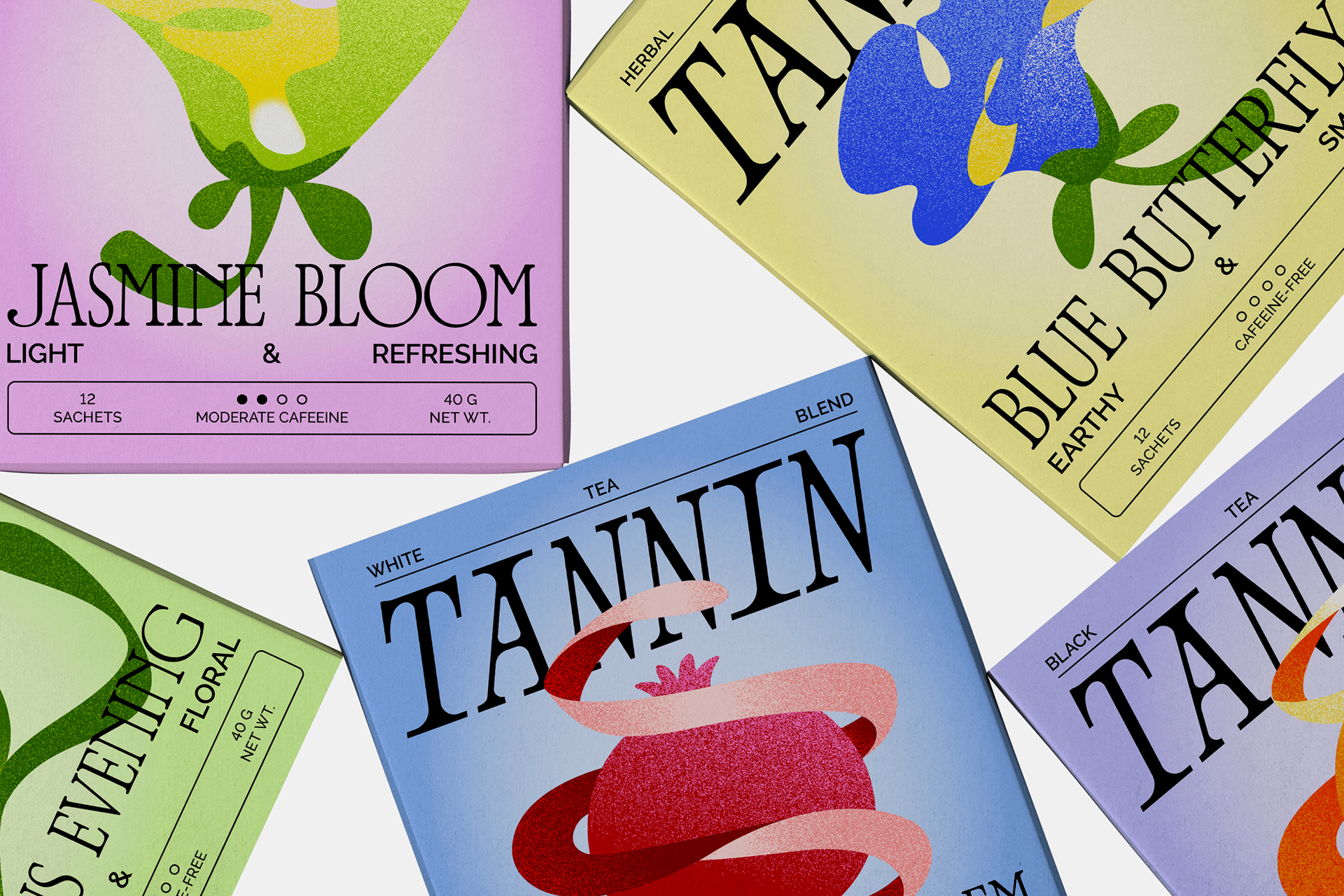
Tea without ceremony. Build around oversized editorial type, grainy botanical forms, candy colors, and small, practical labels. The result should feel like tea in daily city life: a cup in hand, a bright carton on a shelf, a poster seen across the street.
### Start with the assets
1. Read `assets/manifest.json` and inspect the source board closest to the requested output.
2. Read the relevant references below. Use the source images to judge proportions, texture, and density; prose alone cannot establish those details.
3. Reuse a bundled mark, illustration, or template where it fits. The SVGs are editable reconstructions; the original boards are visual references.
4. For new imagery, generate the artwork separately, then compose exact type and labels in SVG or design software. Follow `references/generation-guidance.md`.
5. Render the result and inspect it at its intended size before delivery. Include an editable source and a preview when the task calls for a visual artifact.
### Essentials
* Give one wordmark or display statement clear dominance. Use a high-contrast serif, with italic available for campaign language.
* Let one large botanical form or ribbon cross the type or frame. Keep the silhouette simple and its surface grainy.
* Combine ink, one pastel ground, and one to three saturated accents. Use the working palette in `references/color-and-type.md`.
* Place small sans-serif facts, rules, pills, or seals around the edges. Keep useful information legible.
* Make the center dense and the outer margins calm. Use asymmetry inside a clear rectangular structure.
* Write short, concrete phrases about tea, flavor, and everyday use.
### Non-negotiables
Avoid generic wellness minimalism, beige-only luxury styling, watercolor botanical clipart, evenly spaced centered layouts, and invented Japanese or other Asian visual shorthand. Gradients are not a primary brand device. Never stretch a raster logo. Preserve deliberate overlap without obscuring product facts.
Use the bundled Bodoni Moda and DM Sans as production substitutes. Their use does not establish the original identity's typefaces. Treat palette values and SVGs as reconstructed working assets.
### Read for the task
All filenames below are in `references/`.
| Task | References |
| - | - |
| Understand or review the identity | `brand-foundations.md`, `layout-and-composition.md` |
| Set a logo, seal, palette, or type hierarchy | `logo-and-marks.md`, `color-and-type.md` |
| Create illustrations or image prompts | `illustration-system.md`, `generation-guidance.md` |
| Create photographs or product scenes | `photography.md`, `generation-guidance.md` |
| Design cartons, sachets, cups, merchandise, or signage | `packaging-and-applications.md`, `layout-and-composition.md` |
| Make posters, social posts, or campaign copy | `layout-and-composition.md`, `voice-and-messaging.md`, `packaging-and-applications.md` |
### Check the output
Can you identify the dominant statement immediately? Does the illustration have a distinctive shape and visible grain? Are color, overlap, and small labels doing useful work? Is every word correct, every essential fact readable, and every linked image or font available? Compare the result with a source board before calling it finished.
See `ATTRIBUTION.md` for provenance and `README.md` for local use.
## Visual references and assets
Selected references and assets from the folder:
The working palette pairs dark ink and pastel grounds with saturated accents. Bundled Bodoni Moda and DM Sans provide display and utility type.
| Color | Hex | Role |
| - | - | - |
| Ink | `#11120E` | Wordmarks, headlines, labels, fine rules |
| Warm Ivory | `#F8F5E8` | Neutral ground and breathing room |
| Acid Yellow | `#F8E514` | Bright artwork and accents |
| Electric Chartreuse | `#A9DA1B` | Botanical shapes and sharp accents |
| Powder Blue | `#A8D8EE` | Pastel ground |
| Warm Pink | `#ECA6D5` | Pastel ground or softer artwork |
| Cobalt | `#1647E8` | Saturated illustration contrast |
| Tomato | `#E82745` | Saturated illustration contrast |
| Coral | `#FF725C` | Fruit forms and warm accents |
Use a pronounced jump between display and utility sizes, keeping small facts on a quiet, high-contrast area.
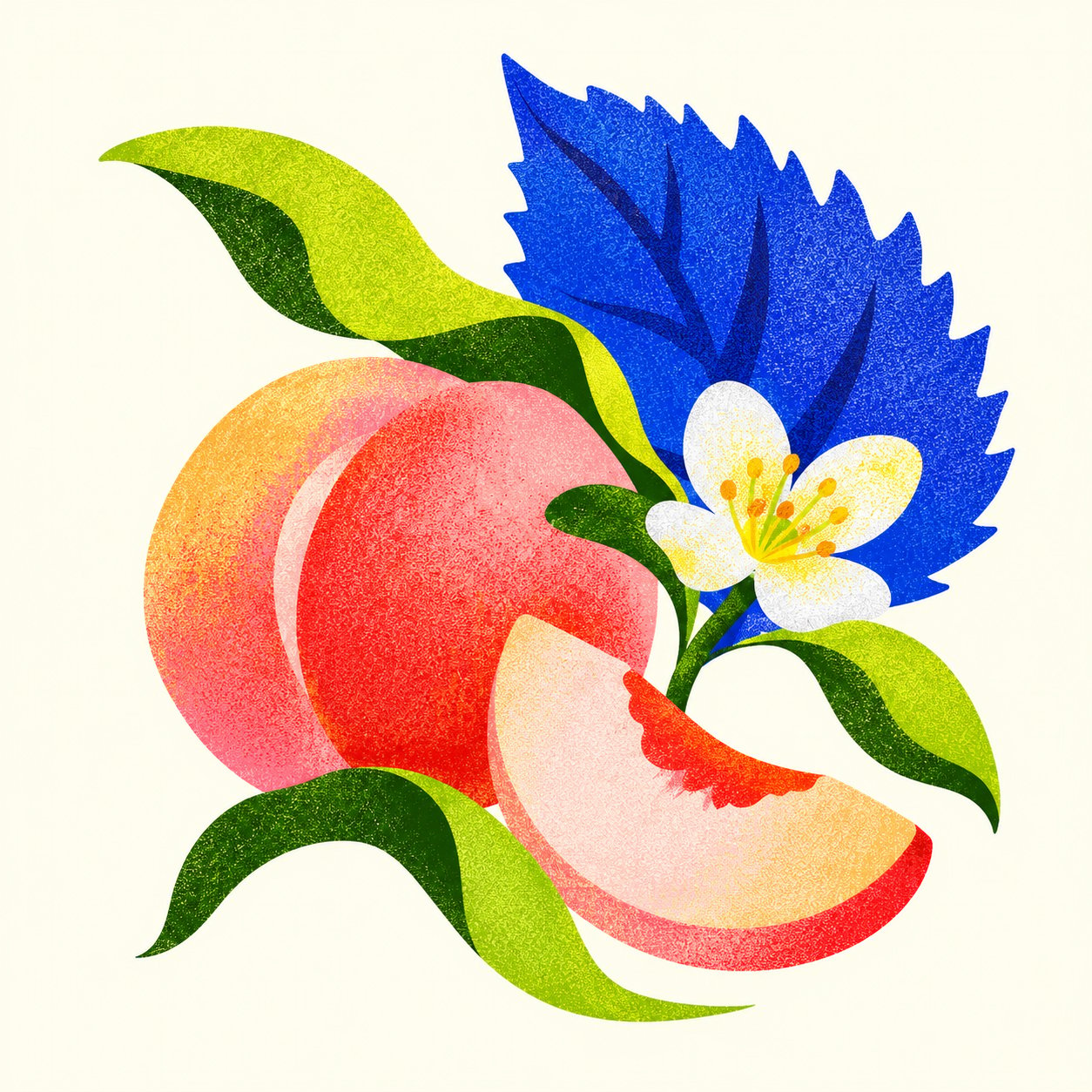
These editable SVGs use large loops, folded petals, and grain to suggest plants and flavor cues.
A generated botanical explores the same style for a proposed Peach Shiso flavor.
## Motion reference
The original identity in motion:
## New applications
The Peach Shiso carton and “Less Polite / More Bite” poster demonstrate new applications of the reconstructed system.
[Open the carton SVG](/images/brand-skill/tannin/svg/examples/peach-shiso-carton.svg) or [open the poster SVG](/images/brand-skill/tannin/svg/examples/less-polite-poster.svg).
## Inside the folder
The folder contains the complete guidance and assets; asset folders below show representative files.
Keep the folder together so its relative links work.
## Use it with an agent
Extract the ZIP, give the folder to your agent, and adapt this starting prompt:
```text theme={"dark"}
Use the TANNIN Brand Skill to create [artifact] in [format]. Start with
SKILL.md, read the references relevant to the task, and inspect the visual
source boards. Use the bundled assets and fonts where they fit. Do not
invent product facts or claims. Review the result against the Skill and
fix any differences before returning the finished artifact, with an
editable source and preview when relevant.
```
For your own brand, [connect an agent to Rainbrand](/mcp/getting-started) or [retrieve a Brand Skill through the API](/guides/use-brand-skill).
This documentation is built and hosted on [Mintlify](https://mintlify.com), a developer documentation platform.
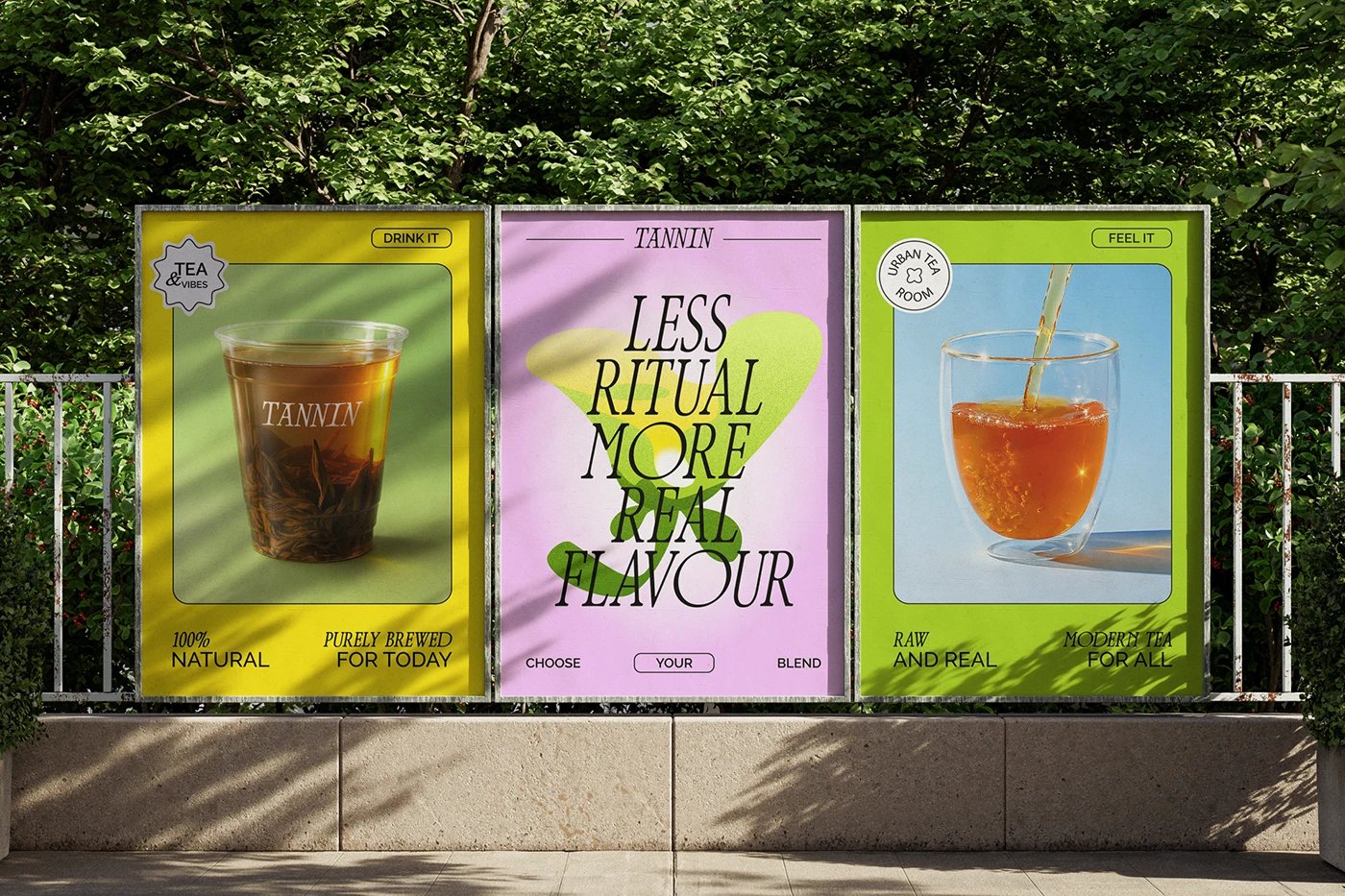


 Based on [TANNIN](https://www.behance.net/gallery/237049849/TANNIN-Urban-Tea-Room-Identity-Packaging), a portfolio concept by Anna Kuziuk. This unofficial demonstration combines original reference boards with reconstructed SVGs, working values, and new applications. TANNIN is not a Rainbrand customer.
 ### Start with the assets
1. Read `assets/manifest.json` and inspect the source board closest to the requested output.
2. Read the relevant references below. Use the source images to judge proportions, texture, and density; prose alone cannot establish those details.
3. Reuse a bundled mark, illustration, or template where it fits. The SVGs are editable reconstructions; the original boards are visual references.
4. For new imagery, generate the artwork separately, then compose exact type and labels in SVG or design software. Follow `references/generation-guidance.md`.
5. Render the result and inspect it at its intended size before delivery. Include an editable source and a preview when the task calls for a visual artifact.
### Essentials
* Give one wordmark or display statement clear dominance. Use a high-contrast serif, with italic available for campaign language.
* Let one large botanical form or ribbon cross the type or frame. Keep the silhouette simple and its surface grainy.
* Combine ink, one pastel ground, and one to three saturated accents. Use the working palette in `references/color-and-type.md`.
* Place small sans-serif facts, rules, pills, or seals around the edges. Keep useful information legible.
* Make the center dense and the outer margins calm. Use asymmetry inside a clear rectangular structure.
* Write short, concrete phrases about tea, flavor, and everyday use.
### Non-negotiables
Avoid generic wellness minimalism, beige-only luxury styling, watercolor botanical clipart, evenly spaced centered layouts, and invented Japanese or other Asian visual shorthand. Gradients are not a primary brand device. Never stretch a raster logo. Preserve deliberate overlap without obscuring product facts.
Use the bundled Bodoni Moda and DM Sans as production substitutes. Their use does not establish the original identity's typefaces. Treat palette values and SVGs as reconstructed working assets.
### Read for the task
All filenames below are in `references/`.
| Task | References |
| - | - |
| Understand or review the identity | `brand-foundations.md`, `layout-and-composition.md` |
| Set a logo, seal, palette, or type hierarchy | `logo-and-marks.md`, `color-and-type.md` |
| Create illustrations or image prompts | `illustration-system.md`, `generation-guidance.md` |
| Create photographs or product scenes | `photography.md`, `generation-guidance.md` |
| Design cartons, sachets, cups, merchandise, or signage | `packaging-and-applications.md`, `layout-and-composition.md` |
| Make posters, social posts, or campaign copy | `layout-and-composition.md`, `voice-and-messaging.md`, `packaging-and-applications.md` |
### Check the output
Can you identify the dominant statement immediately? Does the illustration have a distinctive shape and visible grain? Are color, overlap, and small labels doing useful work? Is every word correct, every essential fact readable, and every linked image or font available? Compare the result with a source board before calling it finished.
See `ATTRIBUTION.md` for provenance and `README.md` for local use.
## Visual references and assets
Selected references and assets from the folder:
### Start with the assets
1. Read `assets/manifest.json` and inspect the source board closest to the requested output.
2. Read the relevant references below. Use the source images to judge proportions, texture, and density; prose alone cannot establish those details.
3. Reuse a bundled mark, illustration, or template where it fits. The SVGs are editable reconstructions; the original boards are visual references.
4. For new imagery, generate the artwork separately, then compose exact type and labels in SVG or design software. Follow `references/generation-guidance.md`.
5. Render the result and inspect it at its intended size before delivery. Include an editable source and a preview when the task calls for a visual artifact.
### Essentials
* Give one wordmark or display statement clear dominance. Use a high-contrast serif, with italic available for campaign language.
* Let one large botanical form or ribbon cross the type or frame. Keep the silhouette simple and its surface grainy.
* Combine ink, one pastel ground, and one to three saturated accents. Use the working palette in `references/color-and-type.md`.
* Place small sans-serif facts, rules, pills, or seals around the edges. Keep useful information legible.
* Make the center dense and the outer margins calm. Use asymmetry inside a clear rectangular structure.
* Write short, concrete phrases about tea, flavor, and everyday use.
### Non-negotiables
Avoid generic wellness minimalism, beige-only luxury styling, watercolor botanical clipart, evenly spaced centered layouts, and invented Japanese or other Asian visual shorthand. Gradients are not a primary brand device. Never stretch a raster logo. Preserve deliberate overlap without obscuring product facts.
Use the bundled Bodoni Moda and DM Sans as production substitutes. Their use does not establish the original identity's typefaces. Treat palette values and SVGs as reconstructed working assets.
### Read for the task
All filenames below are in `references/`.
| Task | References |
| - | - |
| Understand or review the identity | `brand-foundations.md`, `layout-and-composition.md` |
| Set a logo, seal, palette, or type hierarchy | `logo-and-marks.md`, `color-and-type.md` |
| Create illustrations or image prompts | `illustration-system.md`, `generation-guidance.md` |
| Create photographs or product scenes | `photography.md`, `generation-guidance.md` |
| Design cartons, sachets, cups, merchandise, or signage | `packaging-and-applications.md`, `layout-and-composition.md` |
| Make posters, social posts, or campaign copy | `layout-and-composition.md`, `voice-and-messaging.md`, `packaging-and-applications.md` |
### Check the output
Can you identify the dominant statement immediately? Does the illustration have a distinctive shape and visible grain? Are color, overlap, and small labels doing useful work? Is every word correct, every essential fact readable, and every linked image or font available? Compare the result with a source board before calling it finished.
See `ATTRIBUTION.md` for provenance and `README.md` for local use.
## Visual references and assets
Selected references and assets from the folder:
 [Open the carton SVG](/images/brand-skill/tannin/svg/examples/peach-shiso-carton.svg) or [open the poster SVG](/images/brand-skill/tannin/svg/examples/less-polite-poster.svg).
## Inside the folder
The folder contains the complete guidance and assets; asset folders below show representative files.
[Open the carton SVG](/images/brand-skill/tannin/svg/examples/peach-shiso-carton.svg) or [open the poster SVG](/images/brand-skill/tannin/svg/examples/less-polite-poster.svg).
## Inside the folder
The folder contains the complete guidance and assets; asset folders below show representative files.